



Signal Bot
Signal Bot is built for automated execution. Every bot gets its own webhook endpoint, allowing your strategy to send a JSON payload and trigger trades instantly, no manual confirmation, no copy/paste, and no delays.
This makes it ideal for Java/Python scripts, TradingView indicators or PineScript strategies, or any webhook service (IFTTT, Zapier, n8n), Telegram, social media, or on‑chain sentiment tools, or even manual inputs, and any system capable of sending a POST request. Simply point your alerts at the bot, and it’ll handle the rest.
 Signal
 TradingView
 Telegram
 n8n
n8n Discord
 Python
 Finestel
 Exchange
 BTC/USD
 AVAX/USD
 ETH/USDT

Built-In Webhook JSON Generator
Instead of building payloads manually, Signal Bot includes a Webhook JSON Generator that automatically produces a complete webhook-ready JSON structure. It pre-fills the critical fields your signal needs: exchange, action, symbol, size, order type, and security credentials, while keeping every parameter editable for advanced workflows.
Full Signal Customization (No “Fixed Template” Limits)
Your webhook payload can include everything required for real-world strategy execution:
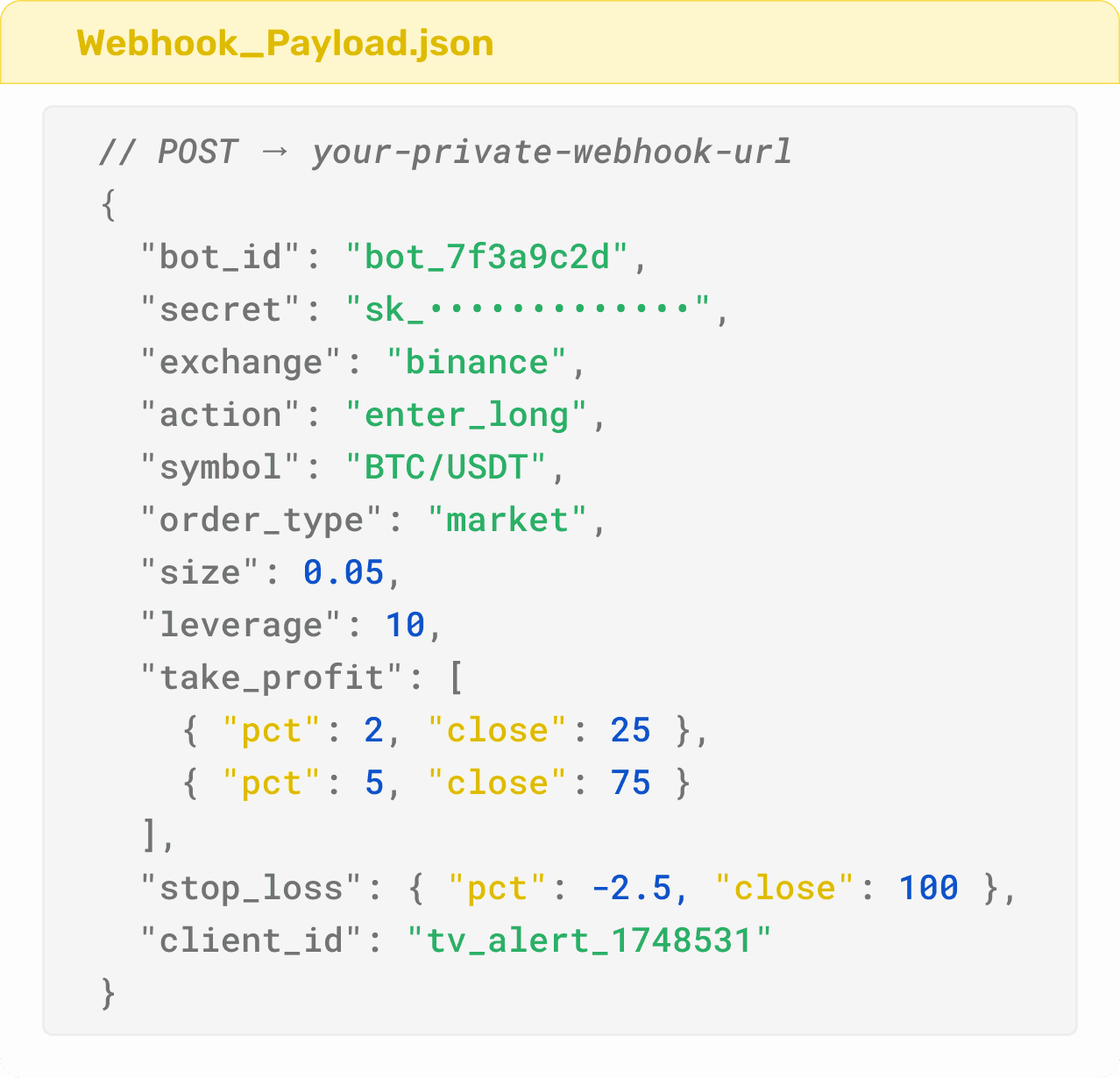
This gives you full control without needing separate bots or different alert templates.
Supported Signal Sources
The bot sits at the end of a webhook. Whatever is on the other end, a chart alert, a script, a no-code flow, a machine learning model, if it can make a POST request, it becomes a live trade. No changes to your existing setup required.
Don't See Your Source on the List?
Reach out and describe your setup. Finestel builds custom signal source integrations on request, if your source can produce data, there's almost certainly a way to connect it. This is something most platforms won't offer.
Let's Talk →Order Types
Fills immediately

Market
Instant execution at best available price.

Limit
Set the exact entry or exit price you want.
Fires on a trigger price

Stop-Market
Fires a market order when your trigger hits.

Stop-Limit
Fires a limit order at your price on the trigger.
Position Mode
How positions are held on the exchange
One-Way
One position per symbol
Hedge
Long & short at once
Those cover a single fill. When you need the system to place and manage many orders as one position; averaging, gridding, timing, or scaling; that's an execution strategy.
Advanced Order ExecutionAdvanced Order Execution
Every order on every bot can run as more than a single fill. Choose how it gets executed; each option below builds and manages the position for you as it fills.
DCA
Enters with a base order, then adds averaging orders as price moves against you. Take-profit recalculates from your new average entry on every fill.
TWAP
Splits a large order into equal parts, executed at fixed intervals. Reduces market impact and smooths your average entry price.
Grid
Places buy and sell orders at set intervals across a price range, profiting from price oscillation without a directional call.
Scale
Splits entry or exit across a price range instead of one price point, improving your average fill on larger positions.
Built-In Risk Controls
Not every strategy should fill the same way. Signal Bot supports both simple and advanced execution methods, allowing you to decide whether you want speed, precision, or reduced market impact.
Your Full Toolkit. Free to Start
Your free trial opens up everything; Signal Bot, TradingView Bot, Terminal, and Copy Trading.
Start today and give yourself a real chance to see what it can do.
Signal Validation & Safety

Signal Bot uses multiple verification layers to prevent unauthorized execution. Every user receives a private webhook URL, and every bot has its own unique credentials:
Both must be present in every incoming payload. If the credentials do not match, the request is rejected instantly before any trade is placed.

Late alerts are dangerous because they execute at the wrong price. Signal Bot prevents this using a configurable lag window. Signals arriving after the allowed delay are discarded automatically.

Automation systems can accidentally fire alerts multiple times. Signal Bot prevents this with built-in duplicate filters:
Together, credential verification, duplicate filtering, and max-lag rejection ensure that only valid, timely signals ever reach execution.
Connect Unlimited Accounts. Run Unlimited Bots
 Connect unlimited exchange accounts to one bot.
 Connect unlimited bots to a single exchange account.
 Run multiple strategies simultaneously without caps or artificial restrictions.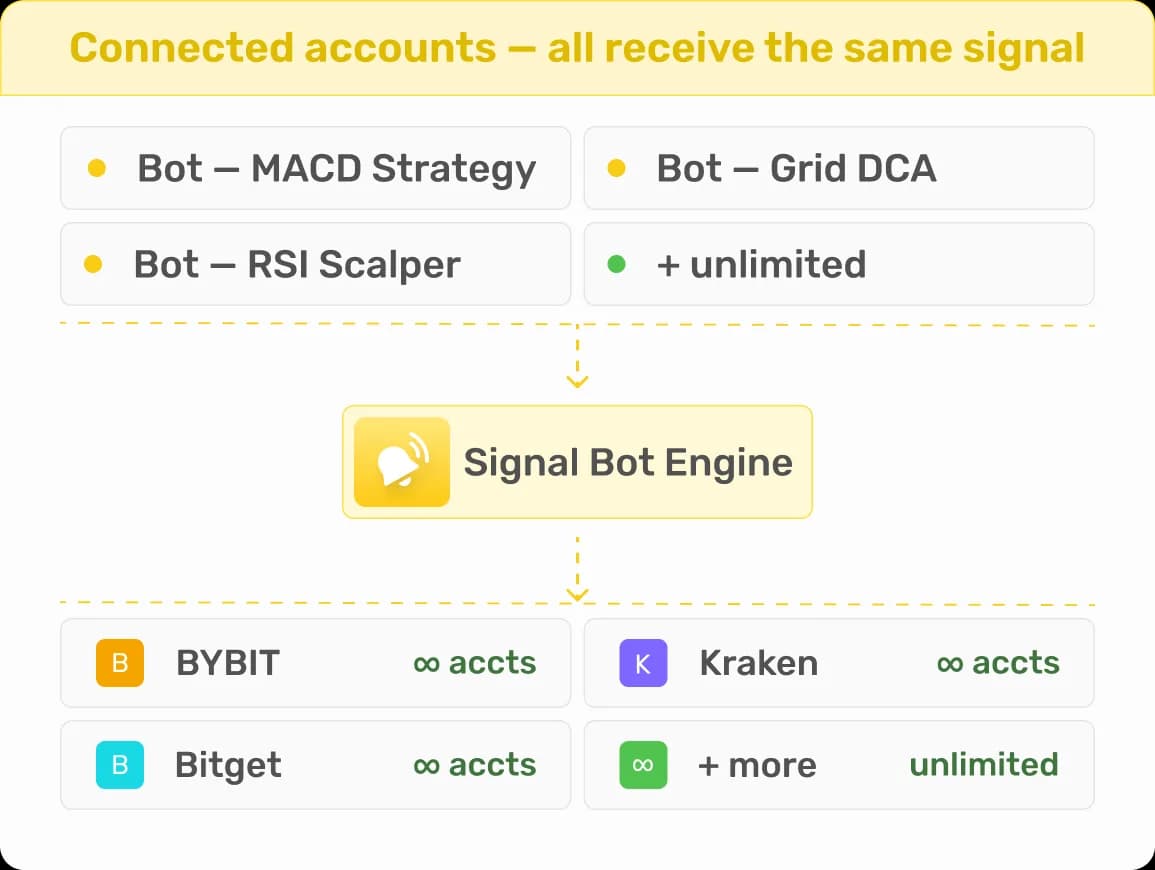
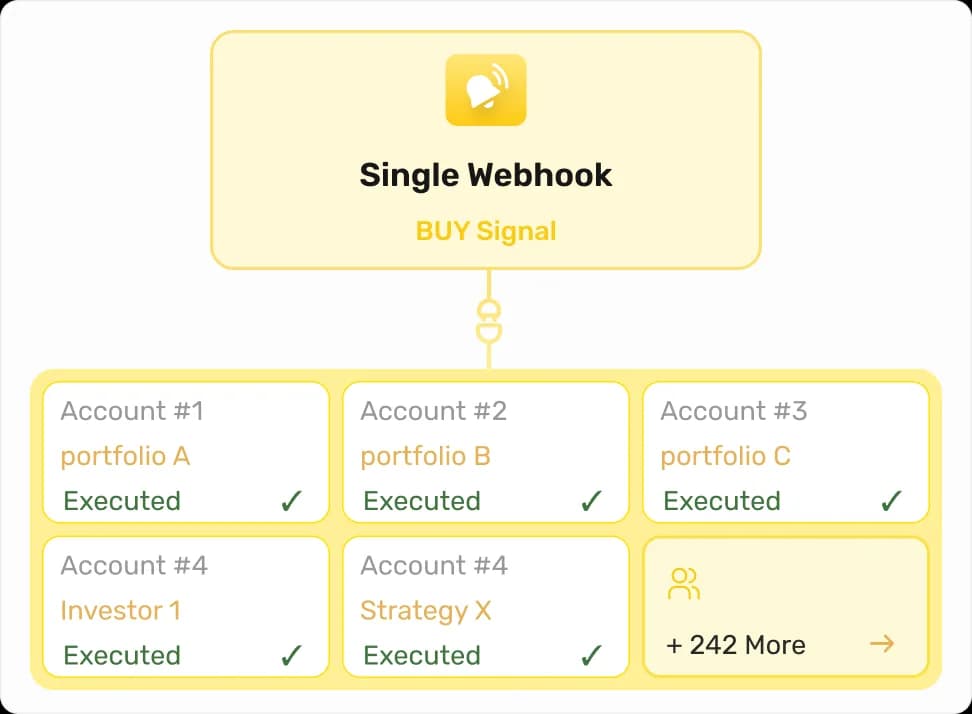
One Signal, Multi-Account Execution
When a webhook signal arrives, Signal Bot can execute it across all connected accounts simultaneously. This enables copy-style execution across multiple portfolios, investor accounts, or segmented strategies, without needing separate alerts.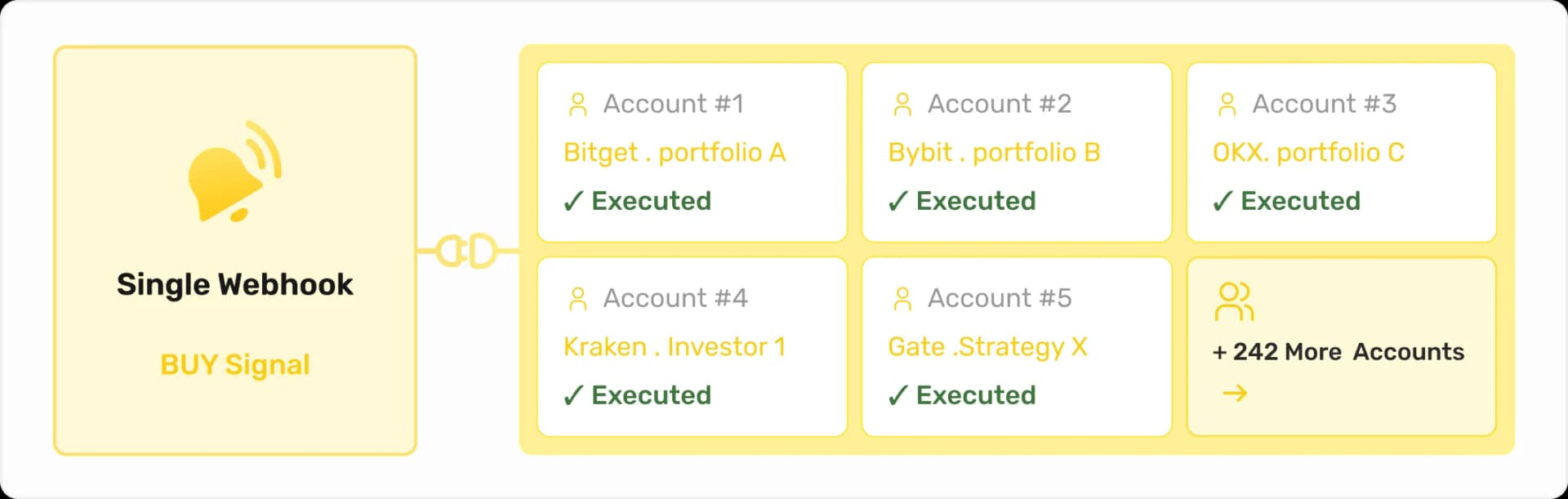
Per-Account Size Multipliers
 Each connected account supports its own Size Multiplier, allowing you to scale exposure independently.
 Run one account at full size, another at reduced size, and another at higher leverage, all from the exact same signal payload.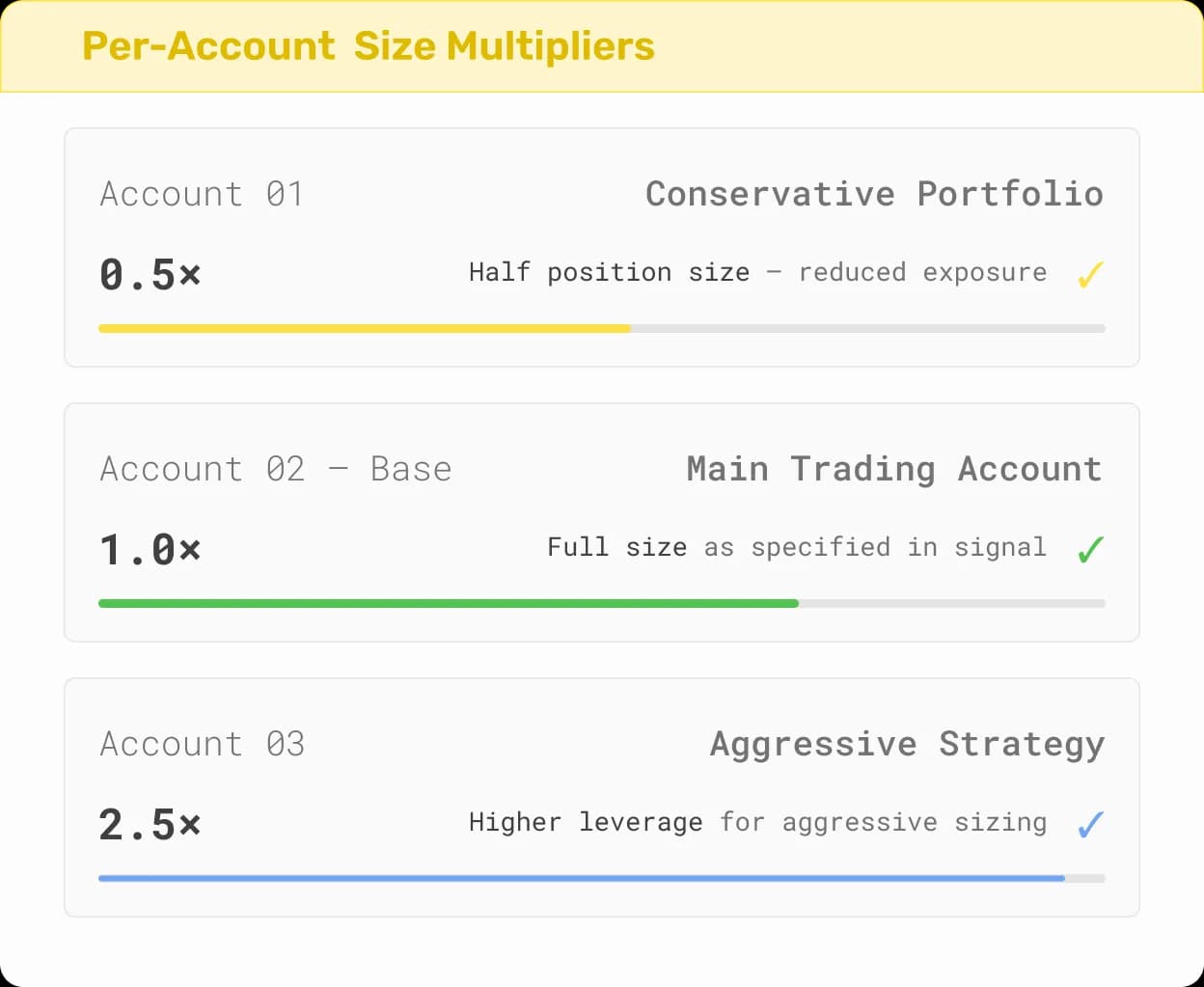
Brand It. Sell It. Scale it
Offer your own trading strategies and bots to clients under your brand with our White Label solution.
How to Start
No server to configure. No code to write. Everything happens inside the dashboard: connect, configure, point your alert source at the webhook URL, and activate.
Step 1 of 5
Add Your Exchange Account(s)
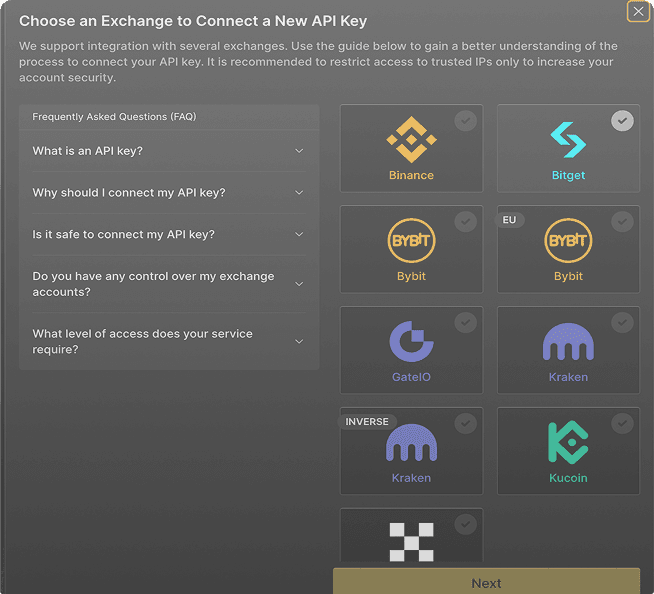
Go to My Exchanges and connect your exchange. You need to connect at least one exchange account to Finestel before you can use any of their services, including the Signal bot.