

Most Python trading bot guides that you stumble upon online walk you through installing ccxt, writing a moving average crossover function, and then calling create_order() in Binance. The problem I have with these guides is that they usually end somewhere around paper trading, and almost none of them talk about what actually breaks in production.
So, this article isn’t a beginner tutorial. I’m assuming you’ve already connected to an exchange API and are building something you intend to run with real capital. What we’ll cover here is the full architecture of a production-grade Python crypto trading bot. We’ll go through how the layers fit together, how to choose a backtesting library, and how to deploy something that doesn’t need consistent monitoring.
Why a Python Trading Bot
Python algorithmic trading didn’t become the default because it’s the fastest option. It became the default because the ecosystem is really hard to compete with. I mean, there is CCXT for exchange connectivity, pandas and NumPy for data manipulation, TA-Lib for indicators, vectorbt and Backtrader for backtesting, asyncio for I/O concurrency. They all exist, work great together, and are well-documented.

If you want to prototype a strategy or backtest it and wire it to a live exchange via the Binance API, you can do that with Python in a day. In Rust or C++, you’re writing infrastructure for weeks before you get there.
But Python also has limitations. For example, the language isn’t great at doing multiple things simultaneously on the CPU. I mean, it occasionally pauses to clean up memory. Now, in the context of a Python crypto trading bot, this is very important. That’s because it can introduce small but unpredictable delays.
Documented benchmarks show Python bots hitting 12ms average latency with spikes to 80ms. Meanwhile, equivalent Rust implementations run at a consistent microsecond level with no pauses. But the real bottleneck is how fast the exchange processes your order and how far you are from their servers. So, it’s not a Python problem. A REST call to Binance takes 50–200ms regardless of what language sends it.
Therefore, I recommend using Python unless your strategy really requires sub-100ms execution. The iteration speed and the Python algorithmic trading library depth are pretty much the best option for most algo traders.
The Architecture of a Python Trading Bot
A Python trading bot has four different layers. Remember to carefully structure the communication between them, as this determines whether the system is debuggable when something breaks. And, based on my personal experience, something always breaks.
- Data layer: The data layer gets market data into the system via REST polling or a live WebSocket feed.
- Strategy layer: This layer takes that data and produces a signal. It should be independently testable and swappable.
- Execution layer: This is where the signal becomes an order. It applies risk rules, handles exchange interactions, and deals with partial fills, rejections, and API errors. It’s also the source of most production bugs.
- State and logging layer: This layer tracks open positions, filled orders, and errors. It also handles outbound alerts via Telegram or a similar solution.
Connecting Python Trading Bots to Exchanges
CCXT is the practical default for Python crypto exchange API work. It gives you a unified interface across 100+ exchanges. It can handle both REST and WebSocket via CCXT Pro, and it abstracts away most exchange-specific request formatting.
Make sure to set enableRateLimit: True on initialization. Hitting rate limits mid-strategy either gets your IP blocked or returns stale data without an obvious error. On the error side, CCXT exposes a proper exception hierarchy, including AuthenticationError, InsufficientFunds, InvalidOrder, and NetworkError. You must structure your handling from specific to general.
CCXT’s abstraction gets thinner in exchange-specific behavior. That’s because symbol naming differs across exchanges. Minimum order sizes and lot size precision also vary and aren’t always consistent through the unified API.
For data feeds, I suggest using REST for order placement and account state. WebSocket is also for live price data. CCXT Pro’s async interface fits naturally into a Python asyncio trading bot, as it streams prices in one task while strategy and execution run as separate tasks.
Now, remember that one thing CCXT won’t handle for you is reconnection. WebSocket connections sometimes drop silently. On reconnect, make sure not to resume from the cached state. Reseed from the REST API for current positions and recent candles before re-engaging the strategy.
How Your Bot Receives Signals
There are two signal architectures a Python trading bot can use:
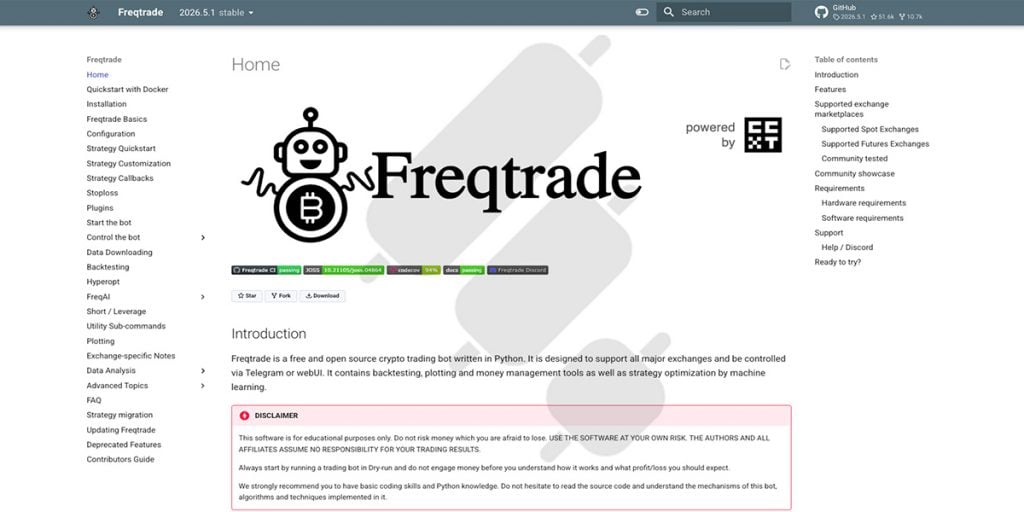
- The first is internal. In this setup, market data comes in, strategy logic runs inside the bot, and then a signal comes out. This is how frameworks like Freqtrade and Jesse generate signals. Our Freqtrade review covers its Python strategy development and testing tools in more detail.
- The second is external, when signals originate somewhere else entirely. This can be a TradingView Pine Script alert, a Python websocket trading feed, or an ML model running as a separate service.
Your Python crypto trading bot’s job is to receive and act on them via a Python webhook listener.
The external pattern is implemented as a lightweight FastAPI or Flask server that accepts POST requests. It validates the payload with a shared secret or HMAC signature and drops a validated signal object onto an asyncio Queue that the execution layer consumes. The FastAPI server and the execution loop run as separate async tasks within the same Python asyncio trading bot process.
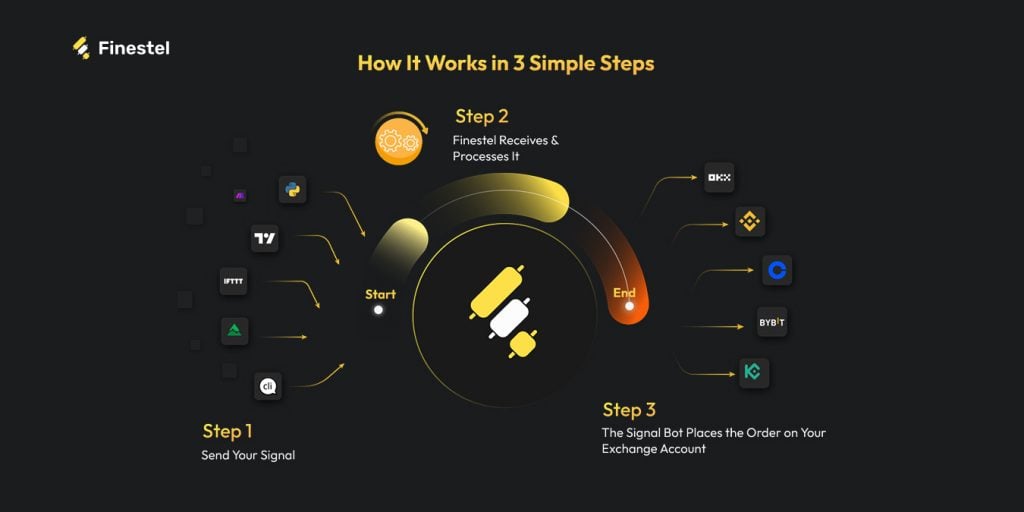
Now, if your Python script already generates signals reliably, you don’t necessarily need to build and maintain the full execution layer yourself. Finestel’s Signal Bot receives signals via a Python webhook and handles order execution, position management, and exchange connectivity across Binance, Bybit, OKX, KuCoin, Bitget, Kraken, and Gate. Your code stays focused on signal generation, and Finestel handles execution.
Risk Management and Position Sizing in Code
Risk management in a Python trading bot is as important as it is in manual trading, and it isn’t a feature you add at the end. There are three components every execution layer needs: position sizing, portfolio-level guards, and circuit breakers.
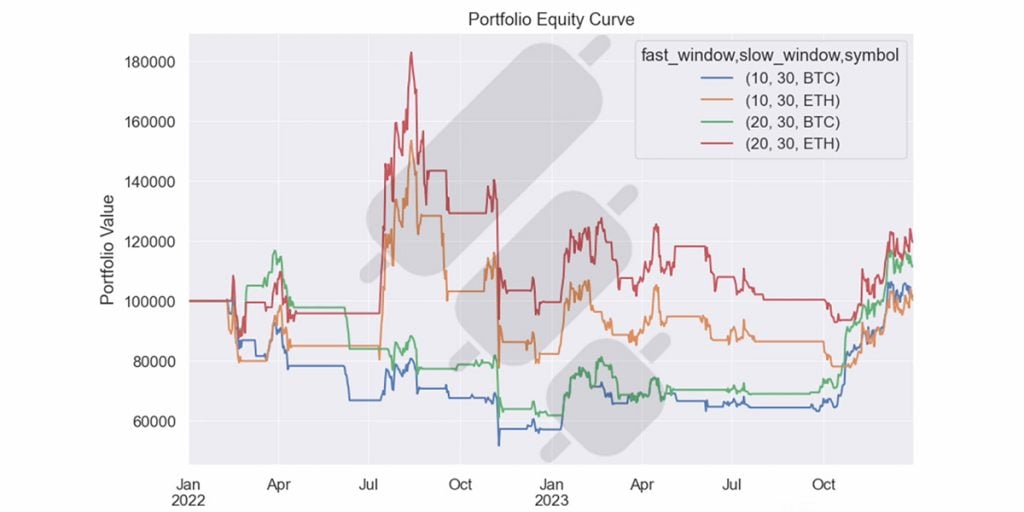
Position sizing is where most developers either hardcode a fixed amount or skip the logic entirely. The more robust approaches:
- Fixed fractional: Risk a fixed percentage of portfolio equity per trade. 1-2% is the standard starting point for Python trading bot risk management.
- ATR-based sizing: Scales position size inversely with recent volatility. The bot automatically trades smaller when the market is moving erratically.
- Half-Kelly: A conservative implementation of the Kelly Criterion that uses win rate and average win/loss ratio to calculate optimal size, then cuts it in half to account for estimation error.
Remember not to use raw float arithmetic for order sizes. Exchanges apply a strict lot size precision. So, even a tiny float rounding error will get your order rejected. I suggest you use Python’s decimal type or round explicitly to the exchange’s required precision before submitting your orders.
The second half of the Python position sizing code is portfolio-level guards and circuit breakers. Here are a few rules I consider worthy of hardcoding:
- Maximum concurrent open positions across all strategies
- Maximum exposure per asset as a percentage of total equity
- Daily drawdown limit (when it’s hit, the bot stops accepting new signals and alerts you)
How to Backtest a Python Trading Bot
Most developers spend too much time optimizing when backtesting and not enough time validating. A strategy that looks clean on historical data can fall apart in live trading for reasons that have almost nothing to do with the logic itself. Factors including slippage, partial fills, API latency, and market impact all affect execution in ways that a simple backtest can’t fully reproduce. The library you choose is the key to how realistic your results are.
| Library | Approach | Best For | Watch Out For |
| vectorbt | Vectorized (NumPy/Numba) | Large-scale parameter sweeps, screening many strategy variations fast | Lookahead bias if index alignment is sloppy |
| Backtrader | Event-driven | Validating execution logic before going live | Slow on large optimization runs |
| Jesse | Framework (backtest + live) | Structured environment without building everything from scratch | Smaller community than Freqtrade |
| Freqtrade | Full bot + backtest + hyperopt | Managed an open-source Python trading bot framework with Telegram control | Less flexible if you need custom execution logic |
| zipline | Vectorized | Legacy codebases only | Largely superseded, not recommended for new projects |
Meanwhile, I must emphasize that the bigger risk with any Python backtesting library is overfitting. This is a classic issue when developing strategies and models on data. Running hundreds of parameter combinations until the equity curve looks good produces a strategy that fits historical noise perfectly well, but not market structure. Always remember that your backtest is a hypothesis, not a result. So, I recommend paper trading and forward testing on an exchange sandbox before risking real capital.
Building a Python Trading Bot for Production
Getting your Python trading bot to execute a trade is quite simple. However, the hard part is getting it to handle everything that goes wrong around that trade. What I mean is that a few things will happen in live trading that your dev environment never surfaced. Some of these issues include WebSocket connections dropping with no error event, market orders filling partially and leaving your position in an undefined state, and even exchange APIs returning success responses on calls that didn’t actually do what you expected.
Now, in my opinion, order state management is the first thing to get right. You should never assume a market order is filled completely. What you should do is to track every order through its full lifecycle, from getting placed, partially filled, filled, or cancelled. When a partial fill happens, your position sizing logic needs to know about it before the next signal arrives. If not, you’ll compound the error.
Regarding the WebSocket reconnect problem, when the connection drops and comes back, don’t resume from the last cached state. The best practice is to reseed current positions and recent candles from the REST API before re-engaging the strategy.
For logging, I suggest using a structured JSON format from the start. This simple consideration lets you correlate a bad trade with its cause much faster. SQLite handles trade logging fine for a single-bot setup. And for alerts, Telegram is the practical standard for Python Telegram bot trading alerts.
When to Build vs. When to Use Existing Infrastructure
At some point, you should ask yourself how much of your Python crypto trading stack you actually want to own. Clearly, building everything yourself gives you full control, but it also has lots of headaches, like maintaining exchange connectivity across multiple APIs and managing uptime on your own infrastructure.
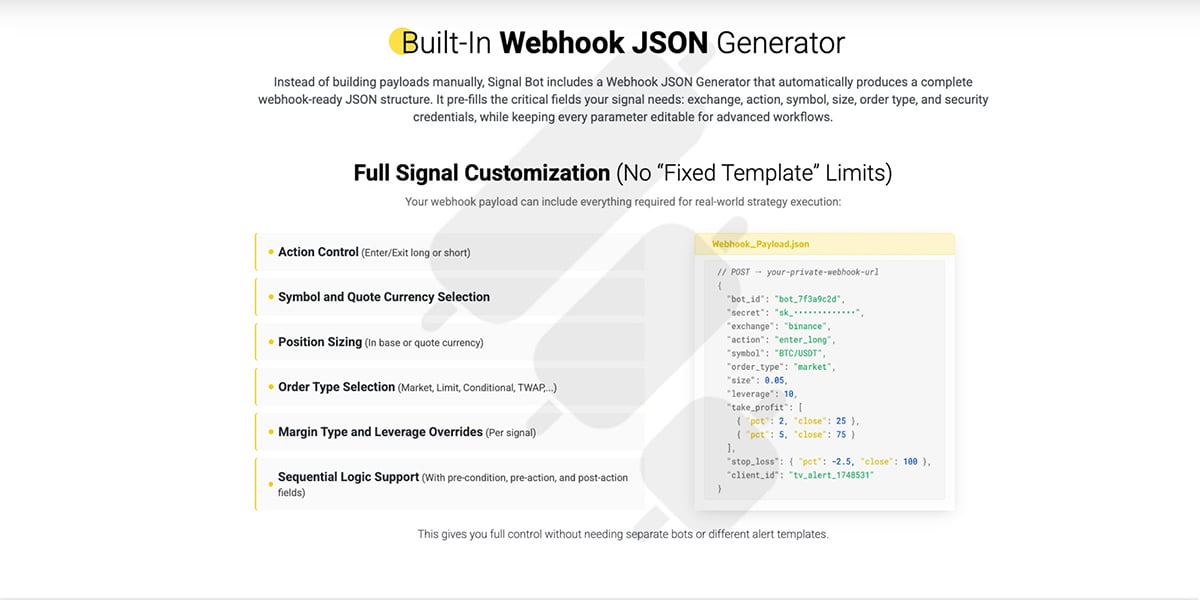
Now, if your edge is in signal generation, then the execution layer is just plumbing. It needs to work reliably, but building it from scratch doesn’t make it work better. Finestel’s Signal Bot receives signals via webhook and handles order execution, position management, and exchange connectivity across popular venues.
If you’re also managing capital for others, Finestel’s copy trading software handles multi-account execution across the same exchanges, and the Trading Terminal is built for professional asset managers running multiple strategies simultaneously. A white-label solution is also available for those who want to offer this as a product under their own brand.
Deploying Your Python Trading Bot
You should be able to run your Python crypto trading bot reliably 24/7 without babysitting it. Deployment comes down to three things: where the bot runs, how it’s packaged, and how you know when something goes wrong.
Infrastructure
For Python VPS deployment, a Linux VPS is the standard. You don’t need much RAM, as a 2GB RAM comfortably handles three to four concurrent Python bot processes alongside logging and monitoring overhead. The most important infrastructure decision is the location. I always recommend picking a data center that is geographically close to your primary exchange’s servers.
And, here are a few baseline infrastructure rules to keep in mind:
- Never run a production bot on your local machine, as power cuts, sleep mode, and OS updates will kill it.
- Always use a dedicated exchange sub-account with “Spot Trading Only” and “No Withdrawal” permissions, as API key compromise is a real risk.
- Store your API keys in environment variables. They should never be hardcoded in config files or version control.
Docker
Python Docker trading bot deployments have become the standard for good reason. The reason is that Docker packages the entire runtime and config into a portable container. The key Docker Compose settings for a production bot are:
- restart: unless-stopped: it auto-recovers from crashes without manual intervention.
- Resource limits: These prevent a runaway process from consuming all available system memory.
- Log rotation: Trade logs grow fast, and uncapped logging will fill your disk.
- Health check endpoint: This can be a simple HTTP ping the container exposes so Docker knows the bot is actually responsive.
One final thing I need to suggest is to keep API keys out of your Docker Compose file entirely. Use a .env file that never gets committed to version control.
Monitoring
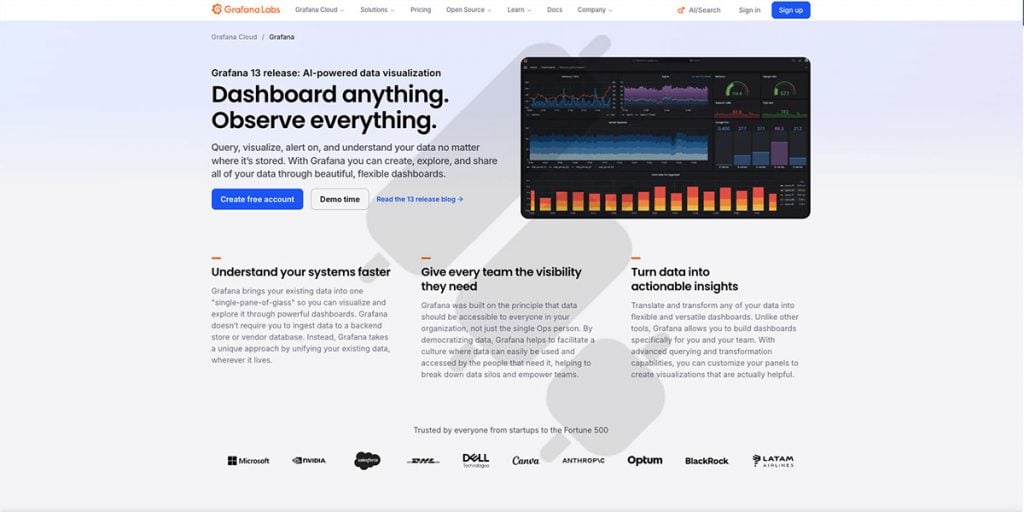
I think it’s quite obvious that a deployed bot you can’t observe is always a liability. The list below shows the minimum viable monitoring stack for a Python trading bot monitoring setup:
- Heartbeat check: The bot pings a simple endpoint every 60 seconds, and if the ping stops, you get alerted immediately.
- Telegram alerts: All trade fills, drawdown thresholds, and any unhandled exceptions should get pushed to your phone in real time.
- Structured logs: The logs should be in JSON format and queryable after the fact when you need to review what happened with a bad trade.
- Prometheus + Grafana: These are for more serious setups and traders. It tracks drawdown over time, API error rate, order fill latency, and strategy-level performance metrics in a dashboard.
Open-Source Frameworks Worth Knowing
Now, you might not want to build every layer from scratch. Luckily, there are a handful of mature Python trading bot open-source frameworks worth evaluating. Remember that none of them is perfect for every use case. So, the right choice for you depends on how much control you really need over execution logic.
| Framework | Best For | Limitations |
| Freqtrade | All-in-one managed bot with backtesting, hyperopt, and Telegram control | Less flexible if you need custom execution logic or multi-exchange simultaneous trading |
| Jesse | Clean strategy API, strong backtesting output, backtest and live in one package | Smaller community, pro features require a one-time purchase |
| Hummingbot | Market-making and arbitrage strategies | Steeper setup, different use case from directional strategies |
| Backtrader | Backtesting and strategy validation | Not designed for live trading out of the box |
I’d also like to add a few honest notes on each:
- Freqtrade is the most actively maintained Python trading bot framework in this list. Docker-native, Telegram-controlled, FreqAI integration for ML strategies, large community.
- Jesse has the cleanest strategy-writing API of the group. Its backtesting output is detailed with QuantStats reports, trade-level metrics, and an equity curve.
- Hummingbot is a different tool for market-making or cross-exchange arbitrage. It’s not the right tool for directional trading.
Searching for keywords related to Python trading bots on GitHub also returns thousands of repositories. However, most of them are abandoned or educational-only. Yet, you can still find some hidden gems if you look well enough.
Conclusion
Building a production-grade Python trading bot is mostly an engineering problem, not a strategy problem. The developers who run into trouble usually have a bot where the layers are tangled, and the deployment was an afterthought. So, I suggest getting the architecture right from the start and understanding where Python’s limitations actually matter.
The full stack we’ve covered here- from exchange connectivity and signal ingestion to risk management, backtesting, and deployment is quite simple to build in Python. But a question you must ask yourself is whether you want to build all of it from scratch. If your edge is in signal generation, tools like Finestel exist to handle execution and exchange connections. Finestel’s different solutions can help you scale from a lone developer to an algorithmic asset manager in a fraction of the time compared to building it yourself. It covers the ground between a simple bot and a robust system.




Leave a Reply