

I decided to write this Insilico Terminal review after noticing some scalpers and crypto folks in the community speaking about its command-line setup. As someone who daily uses trading terminals for trades, I figured I’d see if it performs in real market conditions or if it’s all talk. Initially, I thought it might be too complex for practical use, but it turned out to be more solid than expected.
I dove into the Insilico Terminal CLI for quick executions, tried out the Chase and Scale orders during different sessions, explored the Hyperliquid tie-in, and set up multi-accounts.
In this Insilico Terminal review, I’ll break down the hits, the misses, and who should actually bother with it. This comes straight from my own experience in trading real positions in Insilico Terminal, not some theories.
What Is Insilico Terminal?
Let’s kick off this Insilico Terminal review with the basics: It’s a crypto trading terminal made for managing crypto trading orders efficiently. It mixes a graphical interface with a command-line setup, so you can connect to different exchanges however you like.
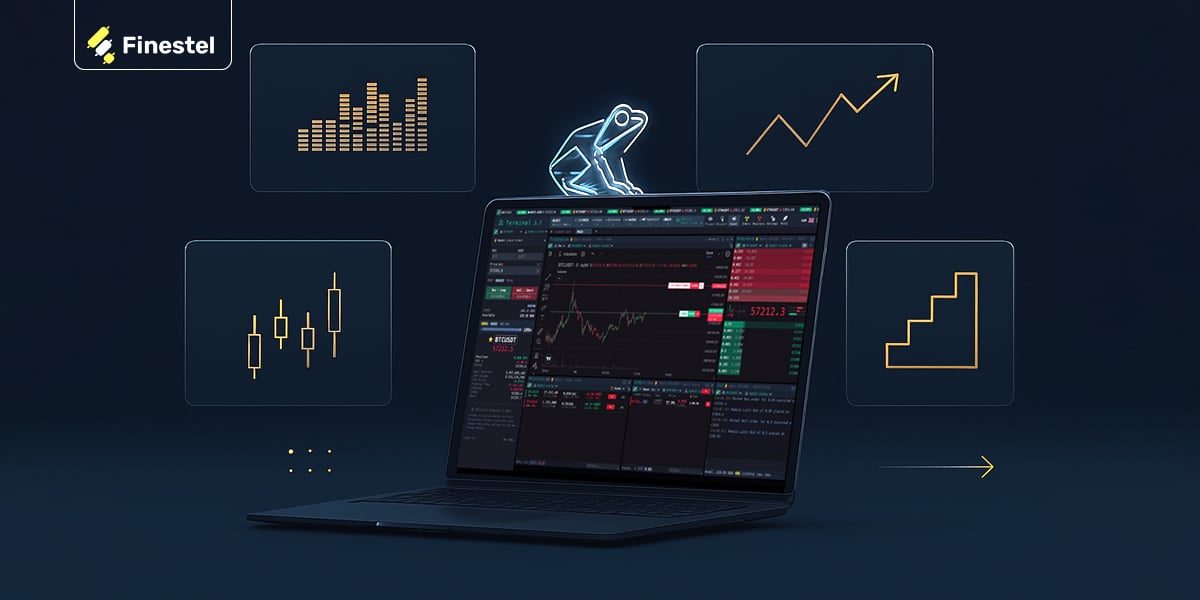
It works great with major CEXs like Binance, Bybit, and Coinbase for spot and futures. For DEX trading, there’s integration with Hyperliquid; a decentralized exchange built specifically for perpetual futures (perps).
Maybe what grabs users right away is the zero-cost entry. yep, Insilico Terminal is free, pulling in revenue from tiny rebates on your existing exchange fees.
This platform targets traders craving low-lag action, like those fed up with exchange freezes in wild swings. It’s solid for that.
From my runs with it, Insilico Terminal comes across as snappy and tweakable, though it’s geared more toward hands-on users than plug-and-play setups I’ve seen elsewhere, like NinjaTrader for broader markets. Still, it’s spot-on for folks wanting quant-level control without scripting from scratch, and the Insilico Terminal docs lay out how to use Insilico Terminal clearly, from API hooks to CLI tricks.
UI, Charts, and Customization
The interface in Insilico Terminal is clean, minimal, and ridiculously customizable, probably one of the strongest parts once you get past the initial setup. It’s not trying to be flashy; it’s built for people who want their workspace exactly how they trade.
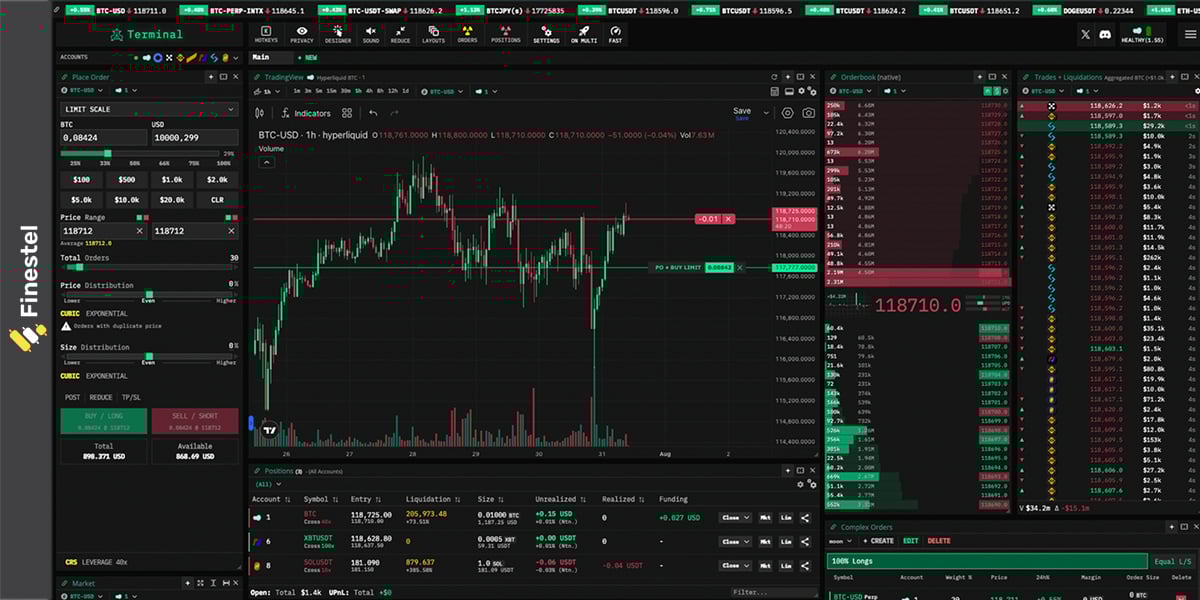
Everything is modular, you can drag and drop panels wherever you want—multiple charts, Depth of Market (DOM) ladders, order entry widgets, positions table, active orders, trades history, whatever. I ended up with a layout that had the DOM on the left for quick clicking, a big chart in the center, positions and P&L right below, and the CLI always visible at the bottom. You can save multiple layouts and switch between them fast.
The built-in chart is solid for a terminal; candles, indicators, drawing tools, and a cool “Designer” mode where you can visually place scale orders or chases right on the chart and see exactly where the slices will sit before sending. There’s also an option to swap in a full TradingView chart if you prefer their tools and indicators.
The DOM is pro-level too; super responsive, shows cumulative volume, your working orders highlighted, and you can customize columns (like adding orderflow footprints or iceberg detection if you want). Clicking on the ladder places or cancels orders instantly.
Insilico Smart Orders: Chase, Scale, and More
Insilico Terminal supports lots of order types, way more than your average exchange app.
For getting in and out sharp, the smart orders stand out as automation without the fluff. Tools like Chase for trailing the bid/ask dynamically and Scale for spreading buys/sells over ranges set up quick through the UI or commands.
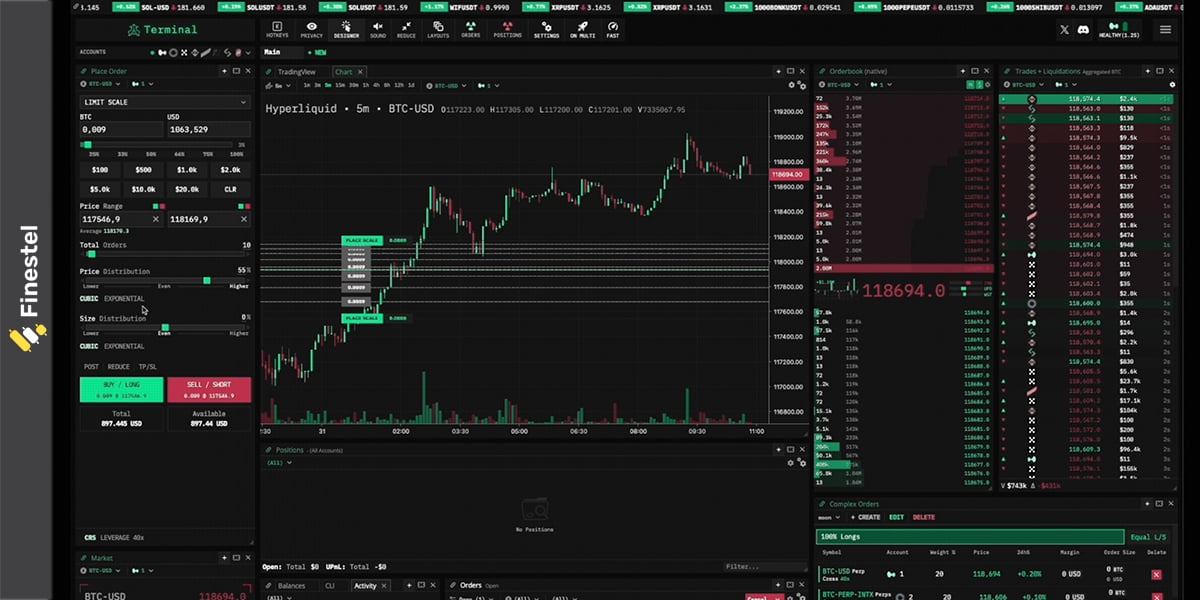
Chase really impressed me, keeps you in the maker zone for rebates while chasing moves, way better than babysitting limits. Scale handled big entries smoothly, slicing them to avoid slippage.
They performed reliably in my live tests, especially with local processing for that instant feel. Downside? It’s got a pretty steep learning curve if you’re new to advanced trading tools. The depth of command-line options, and pro-level orders can feel overwhelming at first; it’s built for experienced traders who want granular control, so beginners might need some time (or tutorials) to get comfortable. It’s definitely worth taking a closer look at its order types.
Order Types Review
- Bump Orders: take an existing limit order and shift its price up or down by a set amount (like a few ticks) without canceling it. I loved this for chasing a moving market, keeps your queue position and feels way smoother than manual cancels/replaces.
- Reverse Position: closes your current trade and immediately opens the opposite side at the same size. I tested this on reversals; it’s seamless, no gap where you’re flat and missing the move.
- Scale Orders: It splits your total order size into smaller limit orders spread across a price range you define (like buying incrementally as price dips). Handled my larger trades beautifully, way less slippage than dumping it all at once.
- Chase Orders (My standout favorite): a limit order that automatically trails the best bid or ask, staying a set distance behind. You control how far it’ll chase before pausing. In live trading, it kept me posting makers for rebates while following trends.
- Swarm Order: Breaks a big market order into tons of tiny ones and blasts them out rapidly (or all at once). Great for thin books where I needed fills fast without one huge order spiking the price.
- TWAP Order: Slices a large order into small chunks and drips them out evenly over a time period you set (minutes or whatever). Perfect for not alerting the market when moving serious size.
- TWAP Chase Order: Does the time-slicing like regular TWAP, but each piece is a chase limit order instead of market. In my tests, this chased better fills and rebates while keeping impact low.
The Insilico CLI Experience
Shifting to the CLI, this is where it gets distinctive (and a bit daunting at first). Tucked at the bottom, it lets traders set buys, closes, or chained actions like canceling and reversing in one go. After getting deep into the Insilico Terminal documentation for shortcuts, it sped up my flow big time, particularly when GUIs lag in chaos.
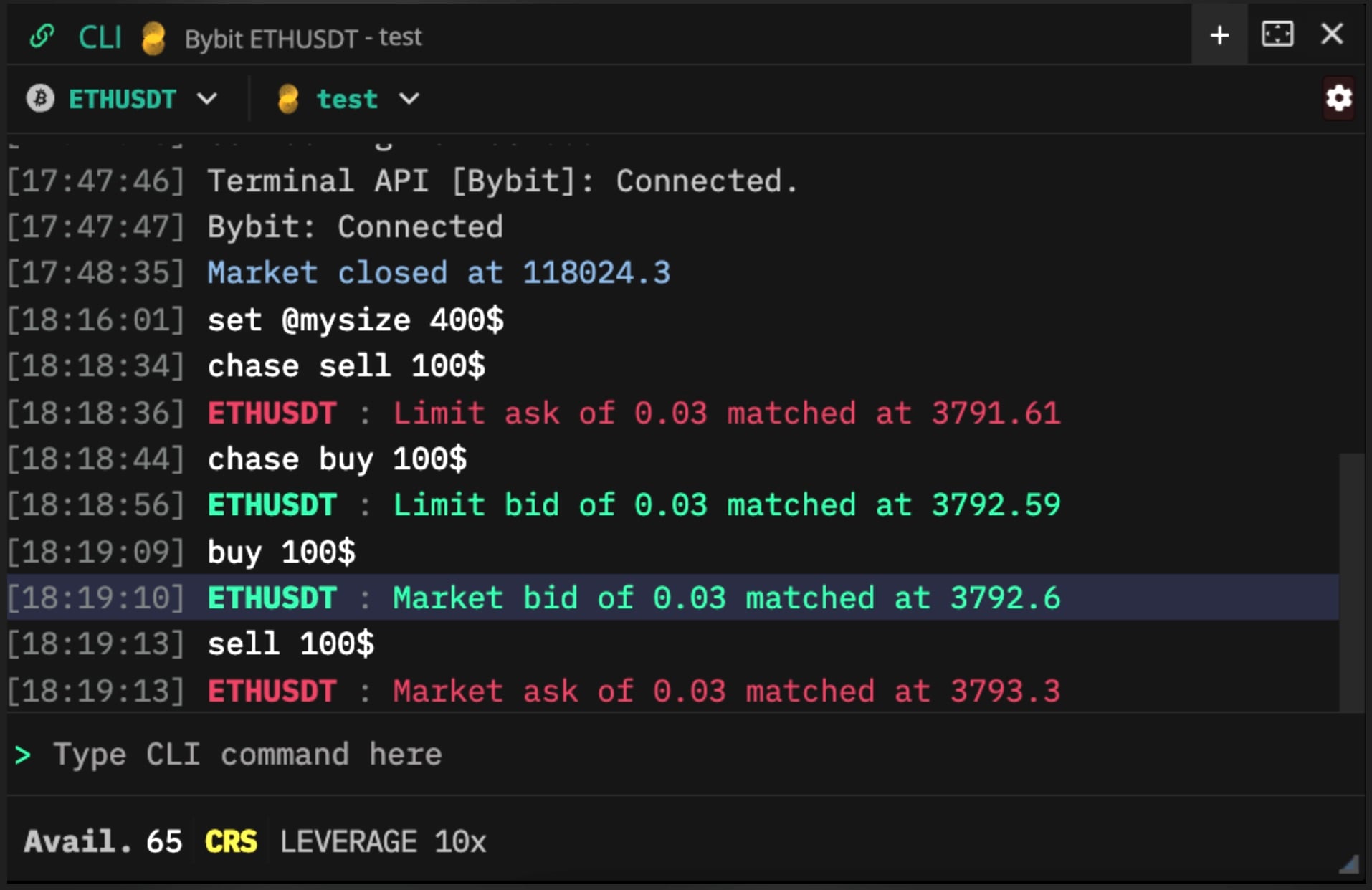
It held up in choppy conditions, but watch for input slips, though caps help there. It’s a beast for efficiency, but if you’re not keyboard-savvy, it might frustrate.
- Simple syntax: Basic stuff like “buy 10” (market buy 10 contracts), “sell 5 @ 60000” (limit sell at 60k), or “buy $500” (buy $500 worth at market). Super intuitive.
- Smart variables: Things like $size (your current position size), $entry (average entry price), % for percentage of balance (e.g., “buy 50%” for half your available margin), or quicksizes from your UI buttons ($quick1, $quick2, etc.). Made pyramiding positions effortless—I’d just hit “buy $size” to double down exactly.
- Advanced orders in one line: All those smart ones we covered work seamlessly, like “scale buy 100 from 58000 to 62000” or “chase sell 20 dist 0.5%” (trails the ask by 0.5%). TWAP too: “twap buy 50 over 5m”.
- Position management: Quick commands like “close” (flatten at market), “reverse” (flip direction), “bump up 10” (nudge limits higher), or “cancel all”.
- Hotkeys and bindings: Bind any command to a key (or combo like ctrl+b) via “bind b ‘buy $quick1′”. Works even if the CLI window isn’t open, and you can set it up for Stream Deck too. I bound my most-used chases and scales, and it felt like trading on steroids, no mouse needed for entries/exits.
- Other perks: Autocomplete (tab), history (up/down arrows), and even UI control commands (like simulating button clicks).
Insilico Multi-Account Setup
A standout in my Insilico Terminal review was Multi Mode, letting you link accounts for synced trades across subs on Bybit or Binance. It’s handy for personal scaling.
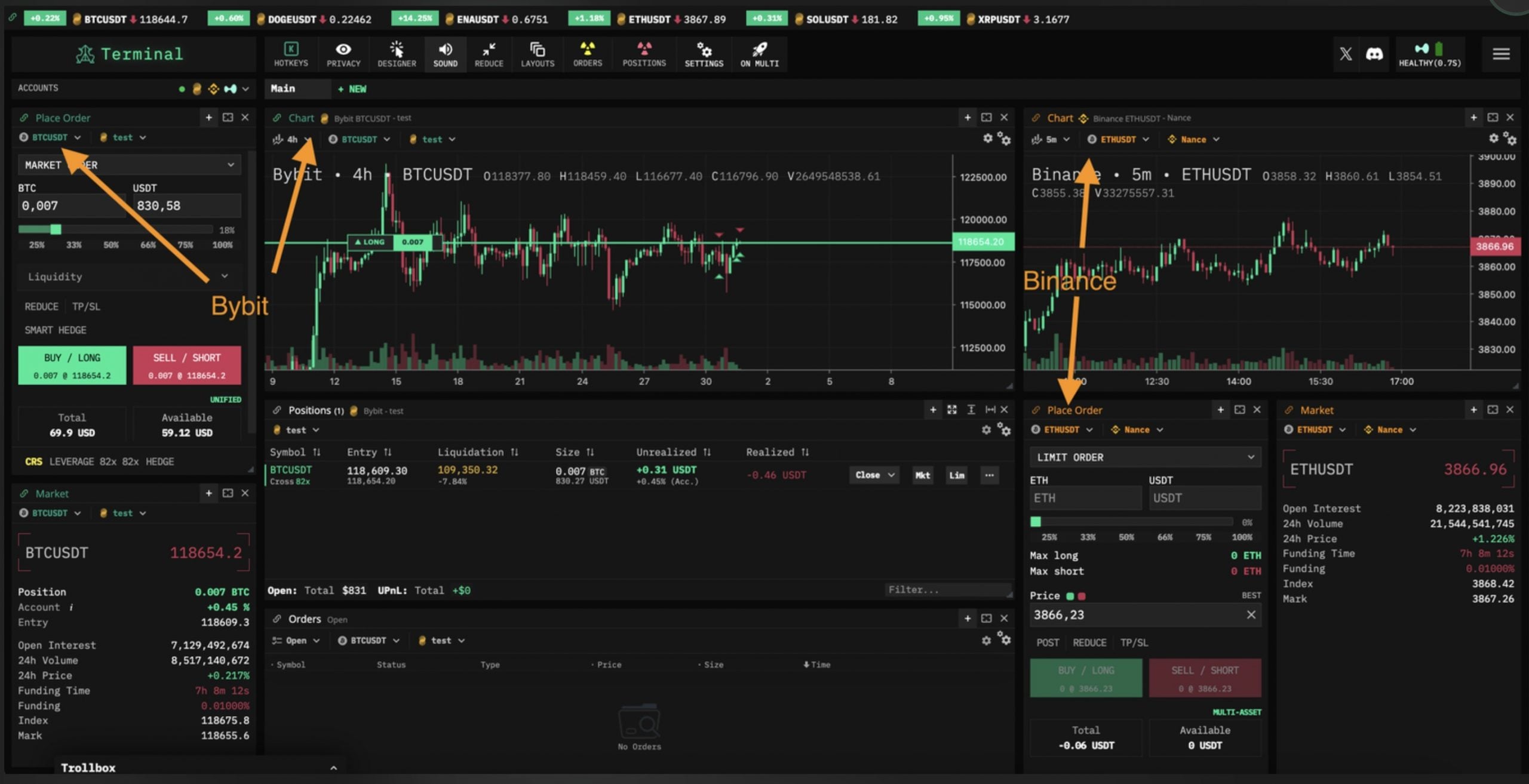
Basically, you can open several tabs or panels inside the same window, each focused on a different ticker, like BTC perps on Hyperliquid in one, ETH spot on Binance in another, and SOL futures on Bybit in a third. The smart part is how everything stays linked and customizable:
- Hotkeys and commands work across all tabs (hit your “close position” key and it closes whatever tab you’re focused on).
- You can group components so charts, DOM (depth of market), order entry, and positions update together when you switch symbols.
- Quick-switch between setups with a click or shortcut, no closing windows or logging in/out.
- All your API connections stay live, so you can react to moves on any market instantly.
In practice, it felt like having multiple dedicated terminals open side-by-side, but lighter and way more organized. Great for spotting arb opportunities, hedging across venues, or just running different strategies without losing focus.
If you’re the type who juggles a few pairs or exchanges at once, Multi Mode makes it smooth instead of stressful. Single-mode is still there if you prefer keeping things simple on one ticker.
Overall Pros/Cons
Pros
- Completely free with no tiers or hidden costs
- Blazing-fast execution and low-latency feel, even in crazy markets
- Powerful smart orders (Chase, Scale, TWAP, Swarm) that actually work reliably
- Deep CLI and hotkey system for insane speed once set up
- Excellent Hyperliquid perps integration
- Fully customizable UI with great DOM and charting options
- Multi Mode for juggling different markets/exchanges smoothly
- No custody; your keys, your funds, everything stays local
Cons
- Steep learning curve, especially the CLI and all the advanced options
- Not beginner-friendly; you’ll need time (and the docs) to feel comfortable
- No mobile app (though the PWA works okay on phones)
- Some features still feel a bit rough around the edges compared to paid platforms
A Good Alternative for Asset Managers: Finestel
If you’re an asset manager handling client portfolios, running copy trading services, or scaling a crypto trading business, Finestel is a strong alternative worth checking out. It’s designed specifically for professional traders and teams, with heavy emphasis on OEMS, copy trading (replicating your trades proportionally across multiple client accounts with minimal slippage), white-labelling (make the platform look like your own), automated trading using trading bots, automated billing (performance fees, management fees, etc.), client onboarding, and reporting tools.

It also includes a solid trading terminal that centralizes everything: connect multiple exchange accounts (spot and futures), execute bulk orders (send the same trade or adjustments, like leverage, margin mode, or cancellations, across dozens or hundreds of accounts simultaneously), customizable position sizing (fixed amounts or percentage-based for different account balances), integrated charting, and risk controls. It’s great for manual trading while managing high volume AUM without repetitive work. Supports major CEXs like Binance, Bybit, OKX, KuCoin, Gate.io, Bitget, and more.
Insilico Multi Mode vs Finestel’s Multi-Exchange, Multi-Account Management
Insilico’s approach is inward-focused, mirroring your own moves. Finestel flips it to pro-level copying for clients.
| Feature | Finestel Multi-Exchange, Multi-Account Management | Insilico Multi Mode |
|---|---|---|
| System Style | Pro setup for mirroring to client portfolios, asset management tools | Personal account linking for self-sync |
| Who It’s For | Asset managers, teams, investment businesses, money managers, wealth managers | Individual traders with multiple subs |
| Mechanics | Master trade broadcasts with per-account tweaks | Manual execution across your links |
| Speed | Bulk for volume | Quick local but solo-scale |
| Exchanges | Wide like Binance, OKX, Kucoin, Bitget, Bybit, Gate, and more | Key CEX + Hyperliquid |
| Tuning | Leverage, filters per portfolio | Hotkeys, basic sync |
| Ideal Use | Fund handling, white-label clients | Quick personal multi-trades |

Insilico Terminal Competitors Review
For solo or small-team manual execution terminals like Insilico (advanced orders, low latency, multi-exchange), the main head-to-head rival is Tealstreet. It’s also completely free, highly customizable, with embedded TradingView charts, scaled orders, chasers (trailing limits), hotkeys, and support for both CEX and some DEX. It feels more intuitive and GUI-focused, making it easier for many traders to get started quickly.
|
Feature |
Insilico Terminal |
Tealstreet |
|
Pricing |
Completely free |
Completely free |
|
Main Focus |
Advanced manual/scalping execution, CLI speed |
Intuitive GUI trading, seamless charting |
|
Smart/Advanced Orders |
Chase, Scale, TWAP/TWAP Chase, Swarm, Bump, Reverse |
Scaled orders, Chasers, trailing/multi-TP |
|
CLI/Hotkeys |
Full powerful CLI + deep hotkey/Stream Deck bindings |
Solid hotkeys/macros, no CLI |
|
DEX Support |
Deep Hyperliquid perps integration |
Yes, including Hyperliquid |
|
Exchanges Supported |
Binance, Bybit, OKX, Bitget, BitMEX, Coinbase, BloFin, Hyperliquid |
15+ CEX/DEX (Binance, Bybit, etc.) |
|
UI/Charting |
Modular/customizable panels, built-in + TradingView option, pro DOM |
Embedded TradingView, clean/intuitive |
|
Multi-Account/Bulk |
Multi Mode for tickers/exchanges |
Multi-exchange interface |
|
Best For |
Experienced scalpers, perps traders, keyboard-heavy workflows |
Traders wanting easy GUI + strong execution |
|
Learning Curve |
Steep (CLI and advanced depth) |
Gentler, more beginner-accessible |
Wrapping up my tests for this Insilico Terminal review, it’s a strong pick for scalpers after CLI zip, smart orders, and Hyperliquid smoothness. Best part? It’s straightforward post-setup, free access opens it up, and elements like DOM shine in daily grinds, backed by the Insilico Terminal Discord energy.
Still, it’s tech-heavy. For advanced automation, portfolio scaling, or team ops, spots like Finestel deliver deeper control. But not all need that level; platforms like Insilico Terminal draw in active traders for good reason, and now I get the appeal.
FAQs about Insilico Terminal Review
Is Insilico Terminal an actual software you download?
Not exactly in the traditional sense; it’s a web-based trading terminal that you access through your browser, but you can install it as a Progressive Web App (PWA). That gives it its own app window and icon on your desktop or phone, so it feels and works just like a native program without any heavy installation.
Does InsilicoTerminal have any user reviews on Reddit, etc?
I scoped Insilico Terminal reviews across spots. Insilico Terminal Reddit threads (like in r/TradingView) tout its edge on Bybit for TWAP and scaling. On Insilico Terminal Twitter (X), posts from @InsilicoTrading mix updates, memes, and wins, like hitting $700B volume or giveaways sparking fun. The Insilico Terminal Discord is lively with 3,800+ folks swapping configs, getting quick fixes, and chatting strategies. Devs chime in often; it builds that collaborative feel, key for evolving tools.
Is InsilicoTerminal Free?
Yes, Insilico Terminal is completely free. It earns a rebate from exchanges on your trades, but it doesn’t add any fees for you.




Leave a Reply