

If you’ve traded crypto actively, you already know the problem with most exchange interfaces. They are often clunky, slow to react, and genuinely not built for how fast the market moves. So when Tealstreet kept coming up in conversations I had about free trading terminals, I decided to give it a proper look, and that’s what led me to write this Tealstreet review.
I’ll walk you through what the platform offers and how Tealstreet V3 changed things. We’ll also take a look at what real users are saying, and whether the “completely free” model holds up under scrutiny. At the end of this post, I’ll compare Tealstreet to its main alternatives so you can figure out if it’s the right fit for your setup, or you’re better off elsewhere.
What Is Tealstreet?
Tealstreet is a crypto trading terminal that is available on the web, desktop, and mobile. It’s for advanced traders who want to replace the native interfaces of the exchanges. I mean, instead of placing your orders through Bybit’s or Binance’s default UI, you connect your accounts via API and trade through a unified interface that actually gives you more tools and features.
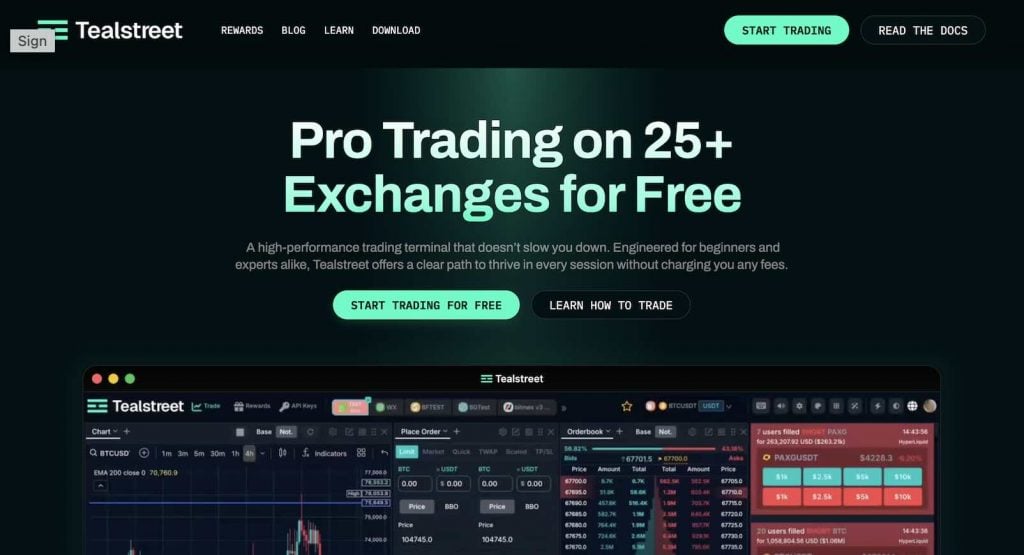
The first notable point I noticed when doing this Tealstreet review is the fact that it supports 15+ exchanges. These include spot and perpetual futures on Bybit, Coinbase, Kraken, and more. And you can trade on all these accounts and markets through the Tealstreet terminal without switching tabs or logging in and out from exchange accounts.
They also claim that the platform was built by traders. This shows in how the product decisions are made, which comes from community feedback and drives the roadmap more than a top-down product team. And the pricing? Completely free. Tealstreet earns through referral arrangements with exchanges. This means you’re not paying a subscription for features, and Tealstreet earns as you trade.
Tealstreet V2 vs V3: Major Update
If you’ve come across an older Tealstreet review, it’s worth knowing that Tealstreet V3, which was launched in October 2024, is a pretty different product from what came before. It was not only a UI refresh, but also a ground-up rebuild, and the most significant update the platform has shipped.
The biggest change is architectural. Tealstreet V3 is serverless by default, which means your API keys never get stored on their servers. They stay on your device. In V2, keys lived on Tealstreet’s infrastructure behind an encryption password. That was fine and worked pretty well, but V3 removes the risk entirely, which is something I really liked about it.
Performance-wise, early benchmarks suggested somewhere between 200% and 500% faster than V2 before most features were even ported over. DOM trading became native, multi-account and multi-chart support got built in properly, the CLI was reworked, and chaser orders were overhauled to be more reliable with exchange behavior.
The UI, as I mentioned, also got rebuilt from scratch. It now has draggable modules, and you can collapse headers to free up screen space. While V3 was genuinely unstable in its early months and some V2 features took time to get ported, by 2026, most of that had caught up. So, these issues are all solved now.
Teelstreat Features
For a free terminal, I think the feature set you’ll see in this Tealstreet review will surprise you. Here are the primary features I’ve found out:
Order Execution
The standout here is where you can place orders from. You’re not stuck with a single order form, and you can execute directly from the chart, the DOM, the order book, or even the integrated news feed if you’re reacting to a headline in real time. You don’t need to have a lot of trading experience to see why that’s a great feature.
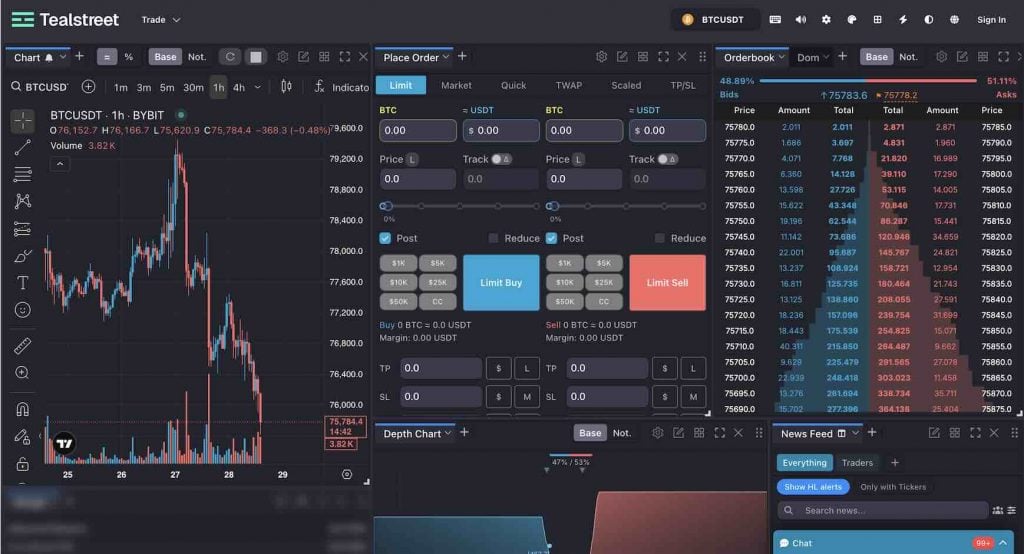
Order types also include scaled orders, quick orders, and chasers, which are essentially trailing limit orders. In Tealstreet V3, chasers were reworked so you can use them to add to or reduce an existing position, not just to open a new one, which is also significant for scalpers.
Hotkeys and Macros
There is full hotkey support with a customizable macro panel. This means that you can bind specific order types, sizes, or sequences to a keystroke and enter or execute them instantly. There’s also the option to stack multiple actions into a single macro for more complex trade flows.
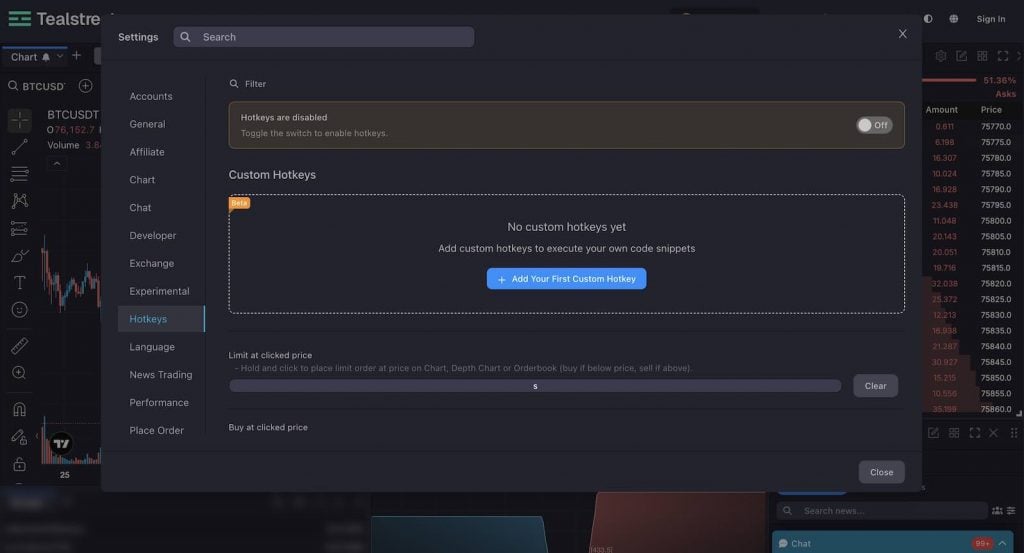
However, note that hotkeys are disabled by default in V3, and you have to activate them manually. That’s an understandable decision to protect new users from accidentally executing orders while they’re still learning how things work.
Multi-Account and Exchange Support
As mentioned earlier in this Tealstreet review, the platform lets you link 15+ accounts from over 25 exchanges. So, you can actually monitor them at the same time without logging in and out.
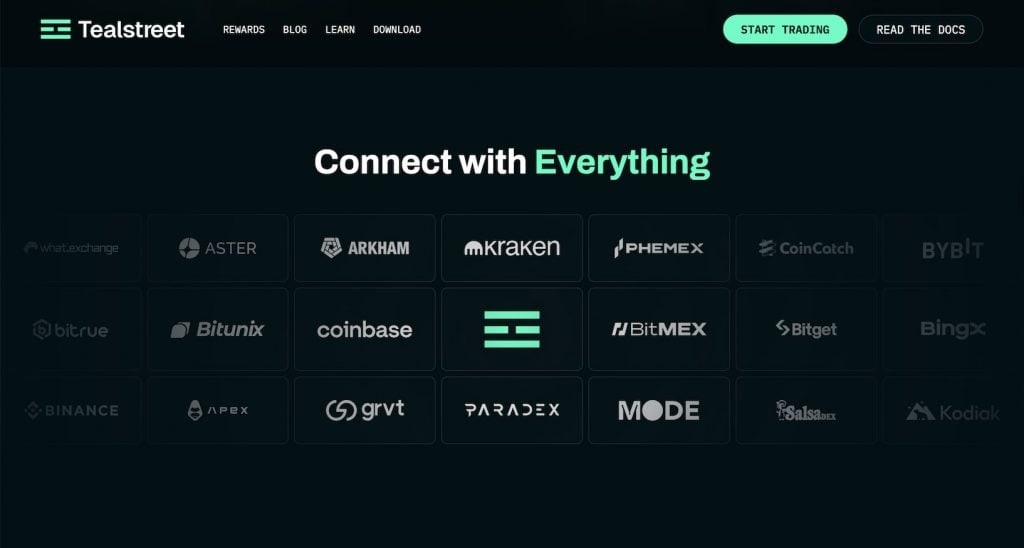
I found Bybit and Binance as the most polished integrations, and the Tealstreet team also calls these out explicitly as the best starting points. Beyond those two, you’ve got Coinbase, Kraken Futures, BitMEX, BloFin, Bitget, and more.
Multi-charting is also native in V3. This might not be something groundbreaking, but it’s worth mentioning. So, you won’t need different browser tabs to track multiple pairs and markets.
Security Architecture
This part ties back to what changed in V3. Because the terminal is serverless, your API keys are encrypted and stored locally on your device. This means they actually never touch Tealstreet’s infrastructure, and there’s simply no server-side database holding them. Yet, as with any crypto trading platform, I recommend setting up 2FA when creating your account, and whitelisting IPs for exchanges that offer it.
News Feed and Real-Time Data
The final significant feature I want to point out in this Tealstreet review is the news and social media feed. You can add a Twitter/X feed directly into your terminal layout. So, if you’re tracking breaking news and on-chain data from social media sources, it will sit right alongside your charts.
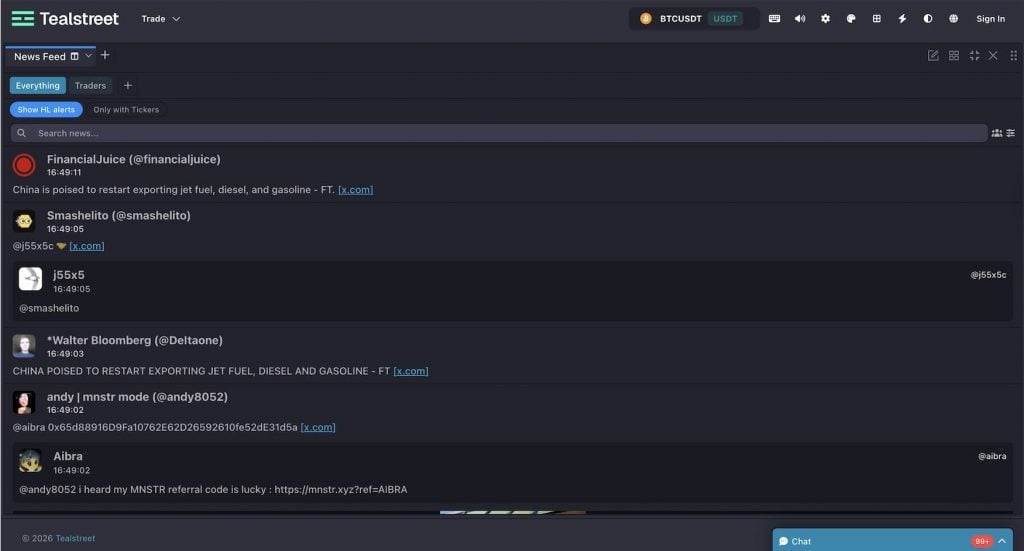
Liquidation data is also available in real time. Audio alerts let you set triggers for price levels or events, which work similarly to TradingView alerts.
Tealstreet Pricing: Is It Really Free?
Yes, Tealstreet is completely free. So, there are no subscription tiers or locked features, as far as I’ve seen. The reason is that Tealstreet’s revenue comes from referral arrangements with exchanges. So, when you connect an account using a Tealstreet referral link, the exchange shares a portion of the fees they were already going to collect from your trading with Tealstreet. You pay nothing extra.
The one exception worth knowing about is Bitunix. Tealstreet requires you to use their referral link when creating your API key there. It’s a slightly different arrangement from the other exchanges, but they disclosed it openly on the blog, and it still doesn’t cost you anything directly. For most other exchanges, there’s no referral link requirement at all. It’s pretty much the cleanest free model I’ve seen in this space.
Tealstreet Reviews Online
The Tealstreet Trustpilot score is 4.2 stars from 7 reviews. Honestly, that’s too small a sample to draw real conclusions from. But what I can say is that there are no negative patterns in those reviews, and the feedback that does exist is substantive.
One reviewer who’s been using it since beta specifically called out how much easier scalping is compared to native exchange UIs. They cited the track-and-limit option and the hotkey system as game-changers.
There are also a few Tealstreet reviews on Reddit. I mean, I didn’t find a dedicated Tealstreet subreddit. The community discussion is actually spread across Discord and X rather than concentrated on Reddit threads.
Overall, the main negative point I found from Tealstreet online reviews is about the V3 transition period, which was around mid-2024. It was rough, as features from Tealstreet V2 took time to port, and some users felt the update was pushed too early. I couldn’t find any newer recurring or major complaints, which is actually a good signal.
Who Is Tealstreet For?
Now, an important question to answer in this Tealstreet review is who it’s actually for. The platform is mainly built for active crypto derivatives traders. You can be a scalper, an intraday trader, or an all-rounder like me who finds exchange UIs too slow or too limited.
Now, if you’re running multiple exchange accounts and need hotkey speed or quick execution during high-volatility moments without the terminal lagging on you, it fits well. It’s less suited for traders looking for automation, copy trading, or asset management at scale.
Pros and Cons
Now, let’s wrap up all the key points mentioned in this Tealstreet review in a pros and cons format. Here are the pros:
- It’s free. There are no tiers, no locked features, and no catch for most exchanges.
- The terminal can operate on 15+ accounts across 25+ exchanges without tab switching.
- API keys never leave your device in V3. It’s serverless by design.
- You can execute orders from the chart, the DOM, the order book, or the news feed in a single session.
- The hotkey and macro system pushes the speed ceiling for scalpers.
- The development team fixes issues quickly and takes community feedback seriously.
And the cons include:
- There are not many online Teelstreat reviews and feedback from real traders.
- Bitunix users would need to use a Tealstreet referral link for API key creation (a limitation for existing Bitunix users).
- There are no automation, copy trading, or portfolio management tools. It’s purely an execution terminal.
- While Bybit and Binance integrations are polished, some other exchange integrations are still catching up.
Tealstreet Terminal Alternatives
Tealstreet is the right tool for a specific kind of trader. But if you need automation, multi-account management at scale, or institutional order types, it’s worth knowing what else is out there. Here are the four most relevant alternatives.
| Platform | Pricing | Best For | Exchange Support | Automation |
| Tealstreet | Free | Solo manual traders, scalpers | 25+ CEX and DEX | No |
| Finestel | Free + paid plans | Asset managers, multi-account ops | Binance, Bybit, OKX, KuCoin, Bitget, and more | Yes |
| Insilico Terminal | Free | Advanced traders, CLI users | Binance, Bybit, Coinbase, and more | Partial (TWAP) |
| Quantower | Freemium | TradFi-to-crypto traders | Multi-asset including crypto | Yes |
- Tealstreet vs. Insilico Terminal: Both are free and built for professional execution, but Insilico combines a point-and-click GUI with a command-line interface and adds institutional order types like TWAP that Tealstreet doesn’t have. Tealstreet is the more beginner-friendly option.
- Tealstreet vs. Quantower: Quantower has a modular pricing structure (which means not fully free), and is stronger on technical analysis and strategy tooling for traders coming from traditional finance. Tealstreet wins on simplicity, onboarding, and cost.
Tealstreet vs Finestel: The Crypto Trading Terminal for Pros
Tealstreet is fast, free, and decent for a solo execution terminal. But once you’re managing more than your own accounts, it hits a wall pretty quickly. Finestel’s trading terminal is built for a different level of operation entirely.
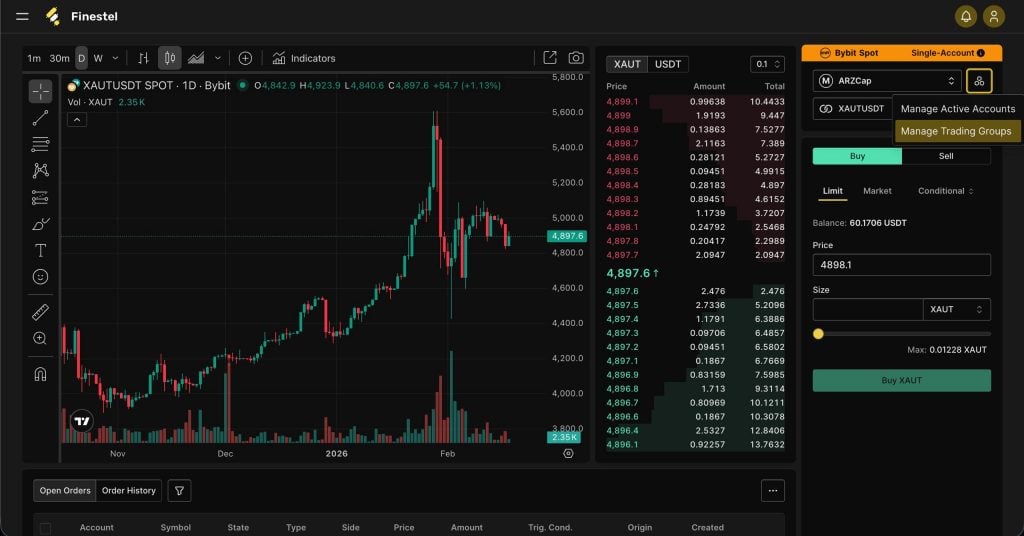
You can connect spot and futures accounts from Binance, Bybit, OKX, KuCoin, Bitget, and more, then execute the same trade across unlimited accounts in a single click. You can assign volume by fixed amount or percentage of portfolio per account, toggle specific accounts on or off per trade, and adjust leverage, margin type, and position mode in bulk, across every account simultaneously.
The bigger picture is that Finestel’s terminal doesn’t sit in isolation. It plugs directly into our cutting-edge copy trading software, the TradingView bot, and the signal bot. So, you can trade from the terminal while automation handles replication and signal execution at scale in the background.
If you’re running a signal service, managing client portfolios, or operating a crypto copy trading business, these integrations are necessary. And if you’re building something bigger, Finestel also offers a white-label solution, so the entire platform runs under your own brand.
Conclusion
To wrap up this Tealstreet review, if you’re an active derivatives trader who wants a fast and free terminal with serious execution tools, Tealstreet can be a decent choice. The TealStreet V3 rebuild addressed the main concerns around security and performance, and the features hold up well against paid alternatives.
That said, if you’ve outgrown solo trading and you’re managing client accounts, running a signal service, or building a copy trading operation, Tealstreet is simply not built for that. I’d recommend giving Finestel a look, as it covers the multi-account, automation, and asset management side of the picture that Tealstreet deliberately leaves out.




Leave a Reply