


If you have ever wondered about using a DCA bot and opened one, you know that using it is not as simple as some might assume. When you set up a DCA bot, you have to fill in a lot of settings, and most of them are not obvious at first. A suitable configuration for a DCA execution must balance three variables: total capital exposure, price coverage, and the point at which the original trade idea becomes invalid. That is why I wrote this guide.
The settings that matter most are base order size, DCA order size, the number of DCA orders, price deviation, step multiplier, size multiplier, take profit, and a few optional execution rules such as pre-conditions and post-actions. Together, they let you build anything from a simple long-term accumulation plan to a signal-driven or multi-account DCA execution.
The limitation is that none of these settings work in isolation. A wider price ladder, for example, usually means higher capital requirements, while a more aggressive size multiplier can turn an ordinary pullback into an oversized position. Over the years, the biggest lesson for me has been that successful DCA bots are rarely the ones with the smartest parameters; they are the ones where every setting fits within a predefined risk budget before the first trade is even opened.
How Does a DCA Bot Work?
A DCA bot buys into a position in small parts instead of all at once. It makes a first buy, called the base order. After that, it makes more buys as the price drops or as time passes. Each new buy changes your average entry price. You do not buy everything at one price, so your average is spread across several prices.
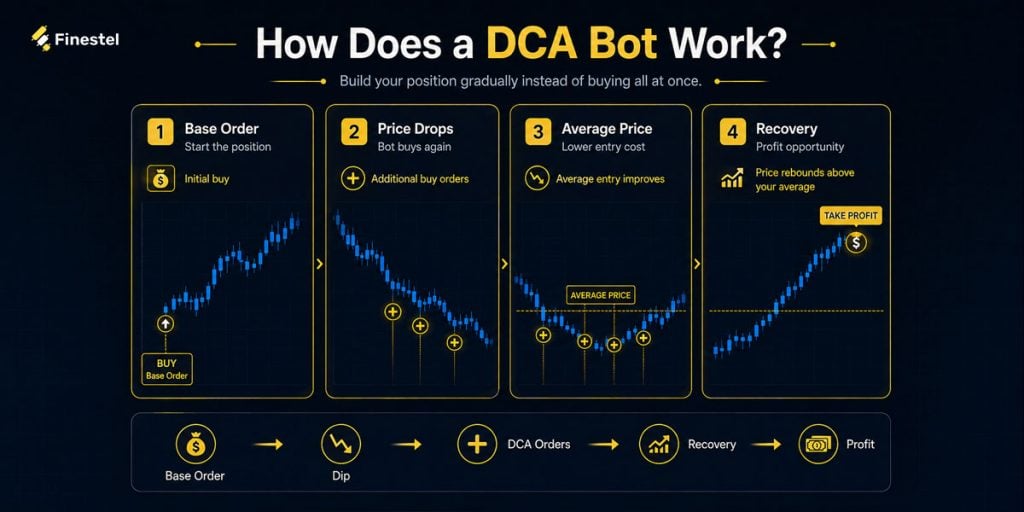
The bot also closes the position for you. When your profit reaches the target you set, it sells and then either stops or starts again. If this seems new to you, our article on the best DCA bots explains it more comprehensively. Here, I will assume you know the basics and want to learn how to set a DCA bot up well.
Core DCA Bot Settings Explained
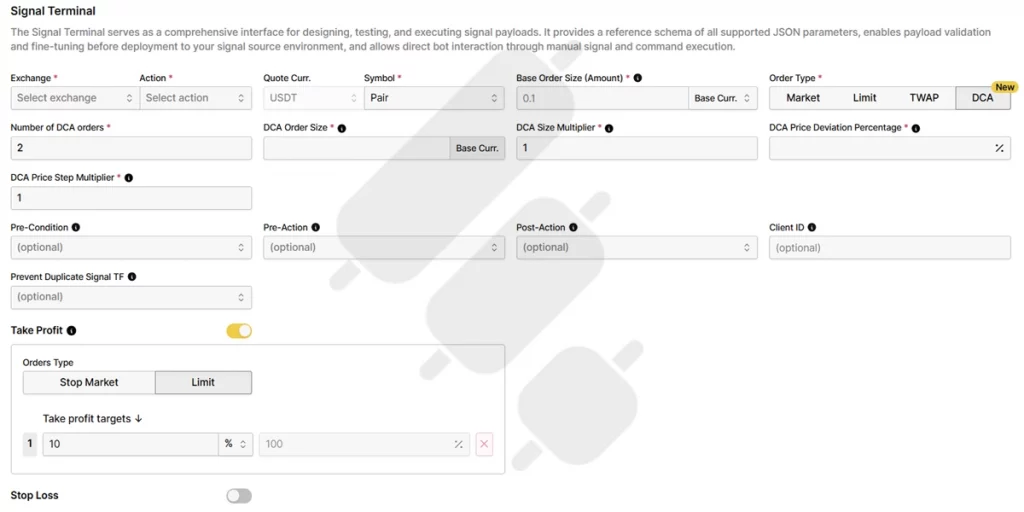
Different platforms use different names for the same setting, and this confuses a lot of people. I will use the names from Finestel’s DCA bot, and I will explain what the setting might be called in other platforms. When you use another tool, look at what the setting does, not its name.
Here is how the settings look on Finestel’s signal terminal:
Base Order Size
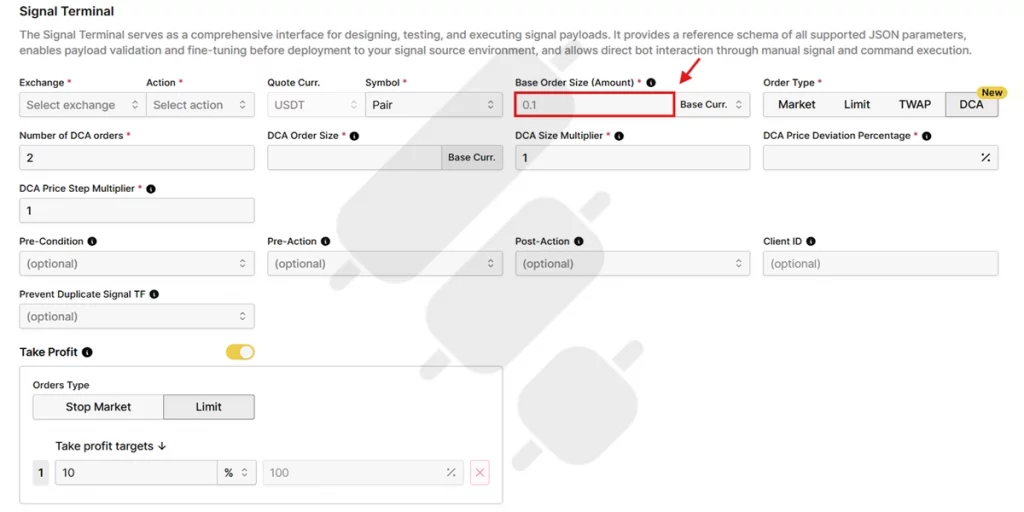
The base order is the bot’s first buy. Almost all platforms use the same name for this setting. It sets how much you put in at the start:
- A large base order means you start with a big position but have less money for later buys.
- A small base order means you keep more money for later buys but start small.
For example, if your total budget is $1,000 and your base order is $400, you only have $600 left for DCA orders. If your base order is $100, you have much more room to average down.
DCA Order Size
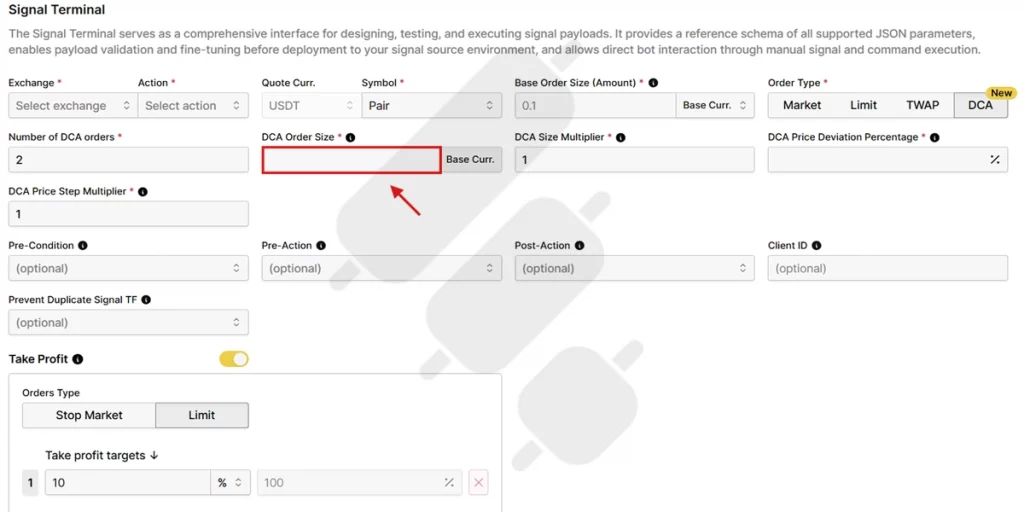
DCA order size, sometimes called “safety order” in other platforms, is the size of the first DCA order the bot makes. It pulls your average entry closer to the current price. If your first DCA order is set to $100, the bot buys another $100 worth of the asset whenever your DCA conditions are met, unless you use a size multiplier.
Number of DCA Orders
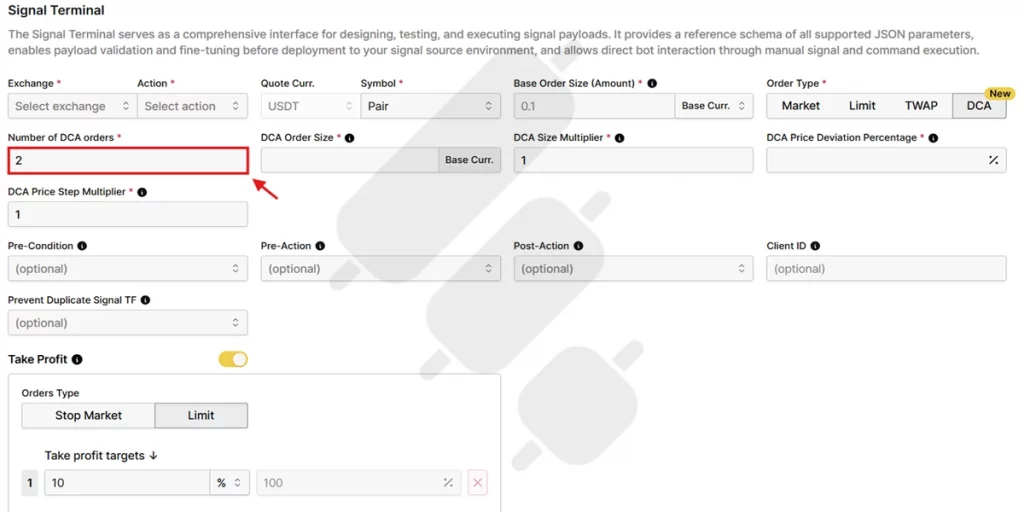
Number of DCA orders refers to the maximum number of additional DCA orders the bot can order. For example, if you allow five DCA orders, the bot can average down five times before it stops buying.
DCA Price Deviation Percentage
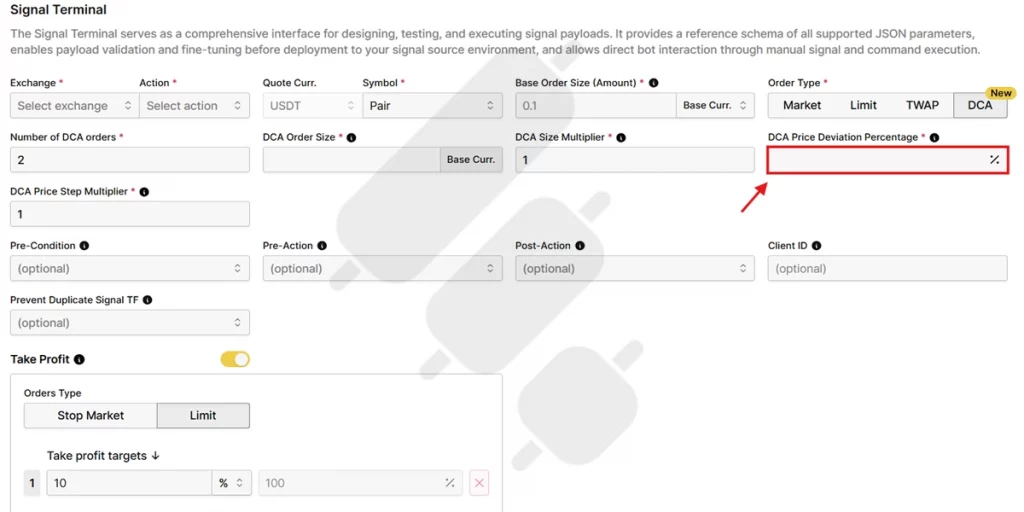
This is how far the price has to drop before the bot places the first DCA order. For example, a 2% drop from the entry price. A small deviation means orders happen fast and close together. A large deviation means the bot waits for bigger drops, which saves your money but can leave it unused if the drop is not that significant.
As a simple example, if your deviation is 2% and you enter at $100, the first DCA order will be placed when the price reaches about $98. Pay attention that this setting has the biggest effect on how fast your bot averages down.
DCA Price Step Multiplier
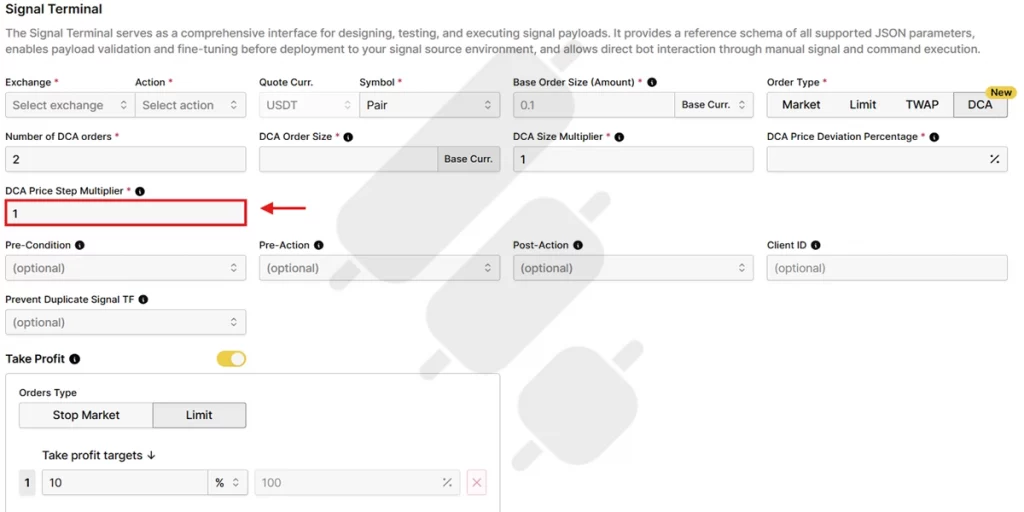
Also called “step scale” on some platforms, this setting increases the gap between each DCA order. The deeper the position goes, the wider the gap gets. If you set it above 1, your first orders are close to each other, and the later ones are further apart. This lets a small number of orders cover a big price range. If it is too high, your deepest orders may sit at prices the market never reaches.
DCA Size Multiplier
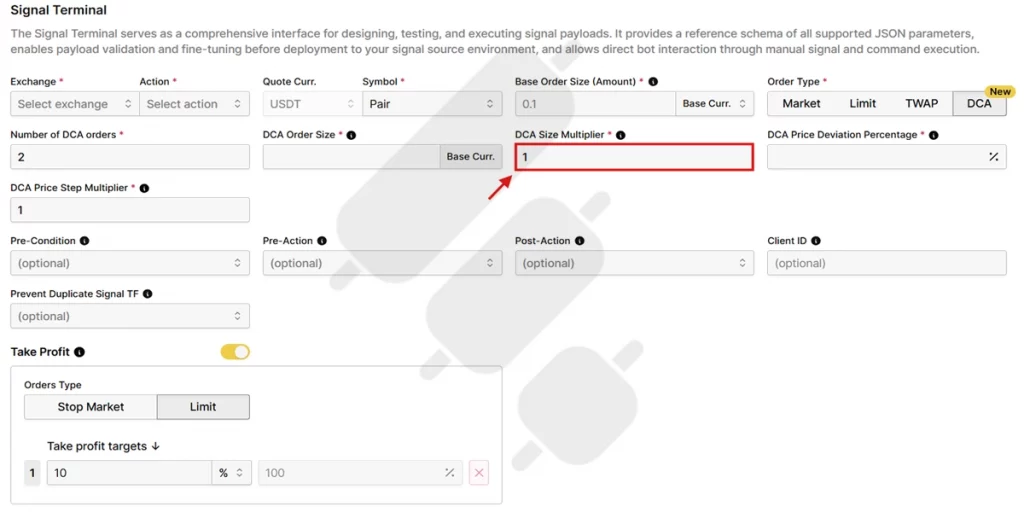
DCA size multiplier, or “volume scale” as some bots might call it, increases the size of each DCA order compared to the last one. If you set it at 1.5, each order is 50% bigger than the one before. This puts more money into your lower buys, so your average price drops faster. But it also increases your risk fast. A high DCA size multiplier can turn a small dip into a much bigger position than you planned. This is the setting I am most careful with.
Take Profit
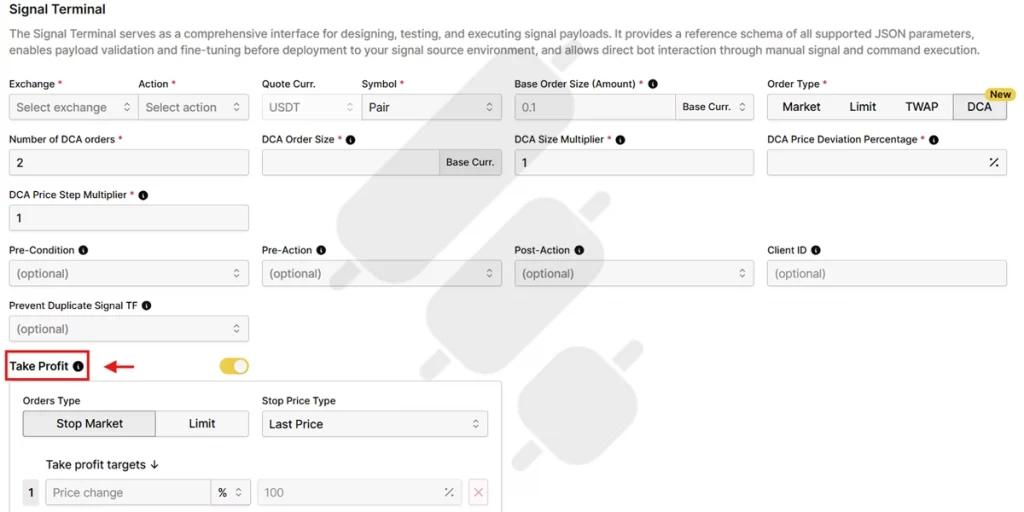
Take-profit is the point where the bot closes the position. It is usually set as a percentage above your average entry price. For example, if your average entry becomes $90 and your take profit is 3%, the bot will close the trade at around $92.70. Because averaging down lowers your average, even a small target can be reached after a big drop. In my experience, the common mistake is setting it too low, because fees and slippage can eat most of your profit.
Take Profit Targets
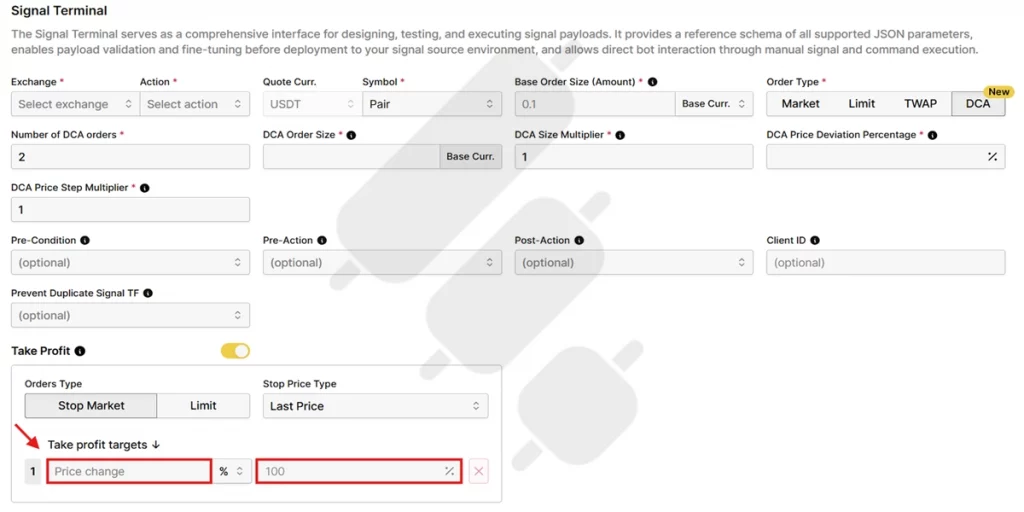
Take profit targets, or “trailing take profit” as some might call it, let the exit move up with the price instead of closing the position at a fixed point. If the price keeps rising past your target, the bot waits and moves the target up. It closes when the price falls back by a fixed amount.
Assume that your take profit is triggered at $100 and the price keeps climbing to $105. In this situation, the bot continues to hold. If the price then drops by your take profit target, it sells instead of waiting for the price to return to $100.
Take profit targets let you make more use of a strong move. By the way, the downside is that you give some profit back when the price turns fast. It works well in trends and less well in choppy markets.
Stop Loss
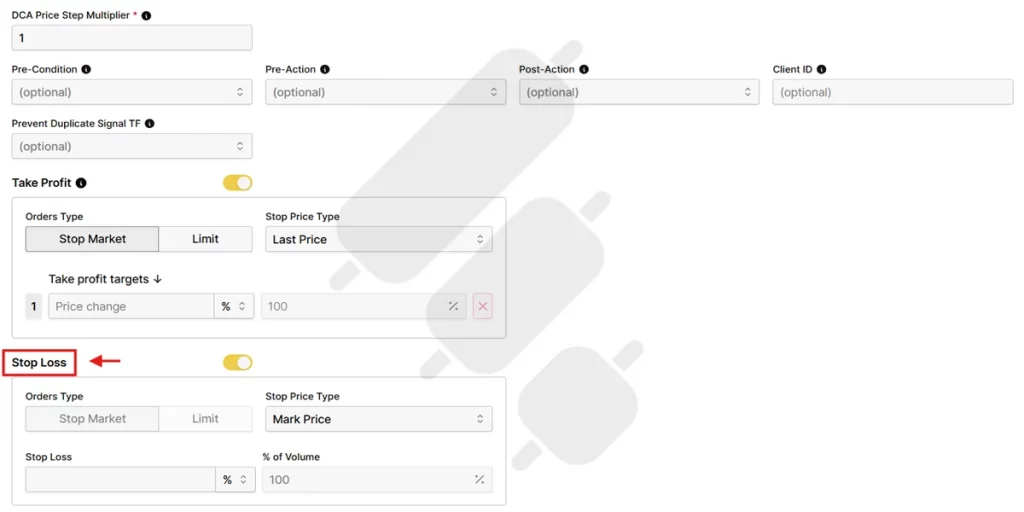
A stop-loss is a crypto risk management strategy that closes the deal if the price falls past a specific level you set. Many people run DCA without a stop loss because they expect the price to recover. But we have repeatedly seen how accounts get wiped out on coins that keep falling.
Interesting Note: You might now be confused about the difference between take profit and stop loss. While their functions might sound similar, here is how they work together: If take-profit hits, the remaining DCA orders and the stop-loss are cancelled. And if the stop-loss hits, the take-profit is cancelled. It is a crypto hedging method.
Pre-Condition (Optional)
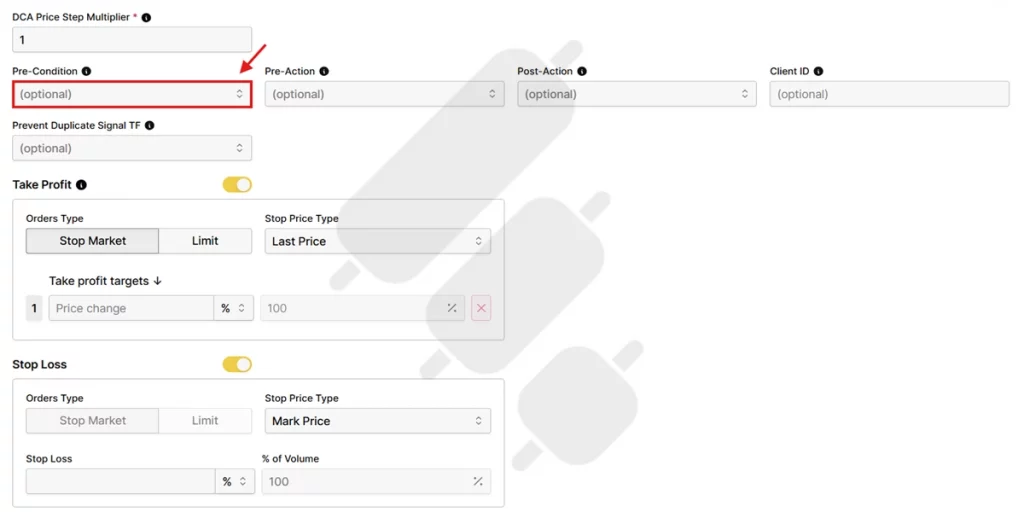
Pre-Condition, sometimes called “trade start condition”, is an optional rule that must be satisfied before the bot is allowed to open your deal. Even if all of your entry signals are triggered, the bot will wait until this additional condition is met before executing the order. This gives you more control over starting the trades.
Pre-Action (Optional)
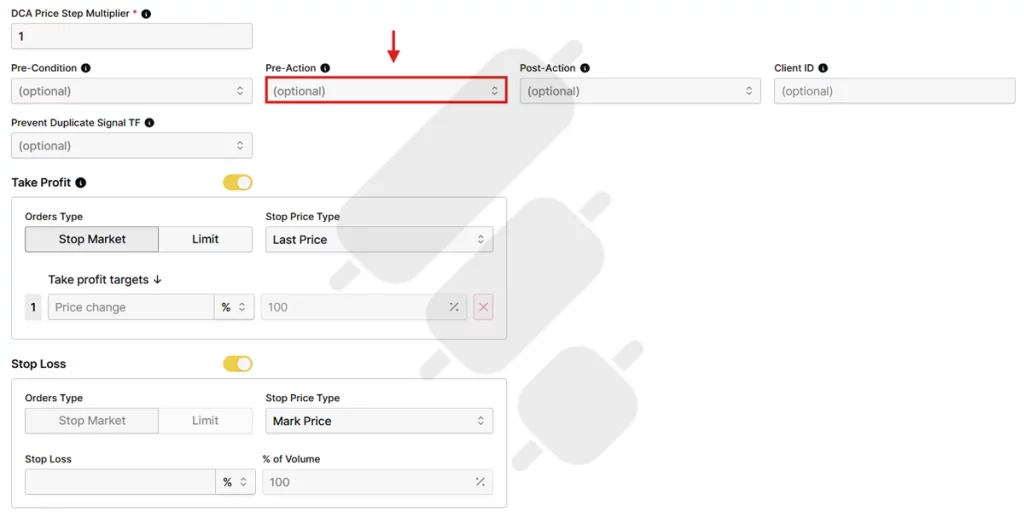
A pre-action is a task that the bot must complete before it executes your trade. Instead of entering a trade immediately, the bot first performs the action you specify and then continues with the entry process. If your strategy depends on something happening before a trade opens, you can handle it with a pre-action.
Post-Action (Optional)
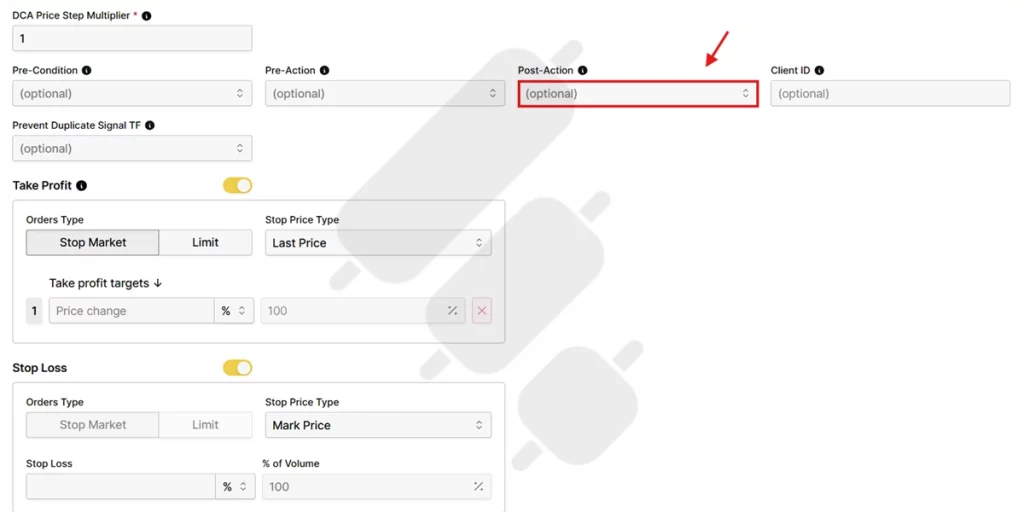
A post-action tells the bot to perform a specific task after it finishes executing your trade. Unlike pre-action, which is an additional condition to be met before the trade begins, post-action is an action the bot has to do after the execution is completed.
The table below acts as a quick reference for the whole set I explained up to now:
| Setting | What It Controls | Main Risk |
| Base Order Size | Initial position size | Too much capital committed before the market moves |
| DCA Order Size | Size of the first DCA order | Using too much capital on the first DCA order |
| Number of DCA Orders | Maximum number of DCA orders | Insufficient capital to handle larger drawdowns |
| DCA Price Deviation Percentage | Distance between orders | Averaging down too early or waiting too long |
| DCA Price Step Multiplier | Growth in order spacing | DCA orders becoming too concentrated or too widely spaced |
| DCA Size Multiplier | Growth in order size | Position size growing too aggressively |
| Take Profit | Position-closing target | Exiting too early or failing to cover trading costs |
| Take Profit Target | Dynamic profit capturing | Profit erosion during reversals |
| Stop Loss | Maximum tolerated loss | Exiting before the market recovers and accepting excessive losses |
| Pre-Condition | When trades begin | Poor, undesirable entry timing |
| Pre-Action | Tasks before executing a trade signal | Delaying execution if the action fails |
| Post-Action | Tasks after executing a trade signal | Extra layers complicating trade management |
How to Choose DCA Bot Settings Based on Risk
This is the part most guides skip, and it is the part that keeps your setup alive. So, let us not skip.
A quick note before proceeding: the numbers I use are only to explain how a setting works, not to tell you how to trade. DCA means buying more of an asset in regular intervals, and like any other trading strategy, it can lose you money. Your own settings should come from your capital and your risk tolerance.
Calculate the Total Capital Needed for All DCA Orders
Add the base order to every DCA order at its full size. Here is an example:
- A $100 base order
- A first DCA order of $100
- A DCA size multiplier of 1.5
- Five safety orders
The DCA orders come to $100, $150, $225, $337.50, and $506.25. That is $1,318.75 in DCA orders, plus the $100 base. So one deal uses $1,418.75, which is over fourteen times the base order. This number has to fit inside the money you set aside for the bot, not your whole balance.
See How Far the Bot Can Average Down Before It Runs Out of Capital
Capital is only half of it. The other half is how far the price can drop before the bot runs out. Using the same example, with a 2% price deviation and a 1.2 price step multiplier, the DCA orders trigger at about these drops below your entry:
| DCA Order | Gap From Previous | Drop From Entry |
| 1 | 2.0% | – 2.0% |
| 2 | 2.4% | -4.4% |
| 3 | 2.9% | -7.3% |
| 4 | 3.5% | -10.7% |
| 5 | 4.1% | -14.9% |
So the bot runs out of orders after about a 15% drop. Below that, it cannot average anymore, and the position just sits at a loss. If the coin often moves more than 15%, this setup is too small for it.
Consider Fees, Slippage, and Exchange Constraints
Besides whatever I explained up to this point, you definitely know that there are some unavoidable market expenses that add up to the final cost. For example:
- Every order pays a fee.
- Exchanges have minimum order sizes that can block a small DCA Order Size.
- Slippage is the gap between the price you expected and the price you got, and it is worse in fast or thin markets.
So, before you trust a take-profit target, take fees and slippage out of it and see if it is still worth the risk.
How to Choose the Right DCA Execution Architecture
Before deciding on how to set the best DCA bot strategies for crypto trading, you should first determine some factors related to your own trading strategy and personal preferences. The most influential ones are here:
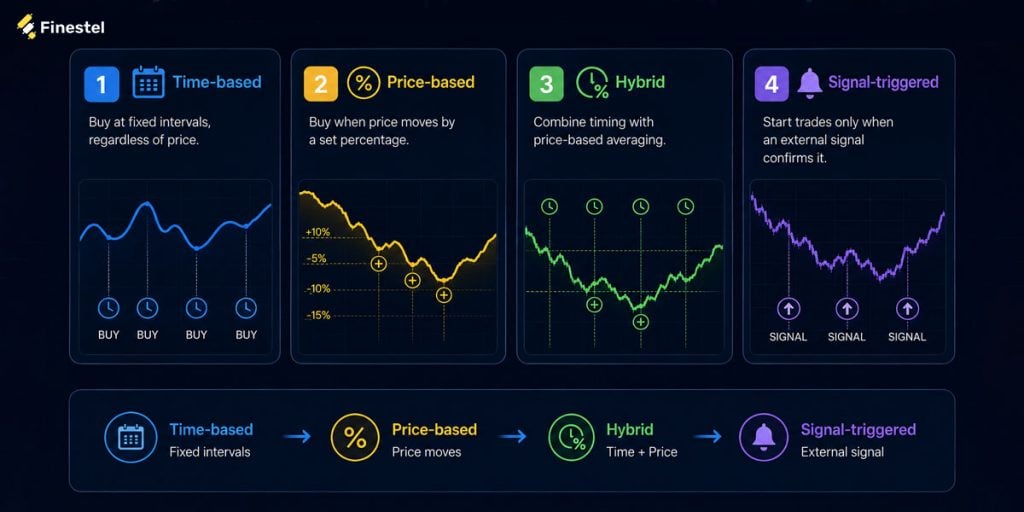
Time-Based, Price-Based, Hybrid, and Signal-Triggered DCA
Time-based, price-based, hybrid, and signal-triggered DCA are not necessarily separate types of crypto trading bots. Instead, they are different methods of configuring and executing a DCA strategy. You can choose the method that best matches your objectives, market expectations, and risk tolerance, and then determine whether a DCA setting is appropriate for them.
Time-Based DCA
If you follow a time-based strategy, you buy at fixed intervals, regardless of short-term price movements. This approach is mainly appropriate for long-term investments.
If you prefer a time-based style, settings related to timing are more important to you than the ones related to price. For example, you’d probably prefer to use a pre-condition. Some bots also have a setting called “Cooldown”, which determines the time between deals. This one can also be useful if you prefer to control the timing.
On the other hand, settings such as price deviation percentage, price step multiplier, and size multiplier are less useful because the strategy does not depend on price drops.
Price-Based DCA
In a price-based DCA strategy, you add to your position when the asset’s price moves by a predefined percentage from a specified reference price. Compared with time-based DCA, price-based DCA generally requires more configuration. The most important settings include:
- DCA price deviation percentage
- Number of DCA orders
- DCA price step multiplier
- DCA size multiplier
- Base order size
- DCA order size
Hybrid DCA
In a hybrid strategy, you combine timing with price-based averaging. Therefore, it uses a combination of all settings.
Signal-Triggered DCA
In a signal-triggered strategy, you start trades only when external crypto signal bots confirm it. For this approach, pre-conditions are the most important setting. After entry, the usual DCA settings apply.
Strategies for Spot vs. Futures Market
On spot, the bot buys the real asset. In the futures market, in copy trading platforms in futures market for example, the bot uses leverage. Note that using leverage makes both the averaging and the risk bigger. As a result, a DCA size multiplier that is safe on the spot market can be dangerous on a leveraged position.
I will elaborate more on this in the following sections.
Single-Account Use vs. Multi-Account Execution and Replication
Are you using a single account, or are you an asset manager controlling multiple accounts at the same time? Running the same setup on many accounts is harder than running a bot on a single account. Doing it by hand is even harder since it is slow and easy to get wrong, and small timing gaps lead to missed opportunities.
If you run several accounts, it would be better to control all of them from one place. Finestel’s trading terminal lets you select many accounts and place the same order on all of them at once, from one screen.

How Finestel Helps Traders Automate DCA Strategies
Most DCA bots focus on automatically averaging into a position after a trade starts. Finestel’s DCA bot takes this further: it starts from your own alerts and runs on many accounts at once. It’s non-custodial, so every account trades through its own API keys.
Signal Bot takes alerts from any source that can send a webhook: your own code, n8n, or other automation tools.
TradingView Bot connects TradingView alerts directly via webhook, so a TradingView strategy can be executed with DCA execution without leaving your existing charting workflow. Considering the popularity of TradingView among traders, we have allocated a separate version to it. Therefore, the TradingView bot is a subcategory of Signal Bot.
Trading Terminal brings account management and advanced execution into one place for triggering and managing a DCA cycle on multiple exchange accounts or trading groups, including Hyperliquid bot.
If you want to copy DCA executions across multiple accounts rather than one, that’s the Trade Copier: trade once on a master account, and it’s replicated to every connected account at the same time, sized in proportion to each account’s balance. The trade copier is included in the Pro plan with a 7-day free trial.
To find out which of the best Hyperliquid trading bots is suitable for you, read our article.
More Than DCA: Every Execution Strategy, One Engine
DCA is one execution type in Finestel. It’s not the only one.
TWAP is also live now; it splits a large order into smaller pieces over time to reduce market impact, for accounts moving size large enough that a single order would move the market against them.
Every execution strategy runs on the same model: define the strategy, trigger it from Signal Bot, TradingView Bot, or Terminal, and the engine handles the rest. Set up your first DCA bot: the Signal Bot, TradingView Bot, and Terminal are all included in the free Starter plan.

Best Trading Strategies to Use with a DCA Bot
Finally, we can move on to the most important part: the best trading strategies to use with a DCA bot. I want to clarify that a DCA bot is an execution tool, not a strategy. In the following parts, I will talk about when and how traders usually use it. They are NOT recommendations by any means; just explanations of how they typically work from experience.
Set a Pre-Condition
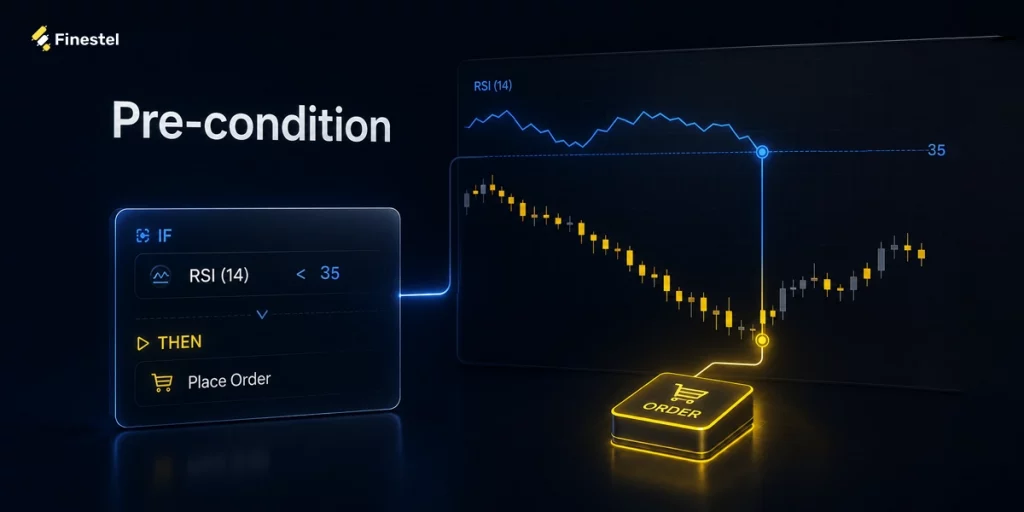
I personally use pre-conditions and make the bot wait for something. On a 4-hour chart, my preferred signal is usually RSI(14) under 35. On a 1-hour chart, I use price closing back under the 20 EMA.
Then set a cooldown if your bot supports it. RSI can sit under 35 for six hours straight, and without a cooldown the bot opens a new deal every time the condition is checked. I use 60 minutes on the 1-hour chart and 4 hours on the 4-hour chart.
Range Setup for a Coin Ranging Between Two Levels
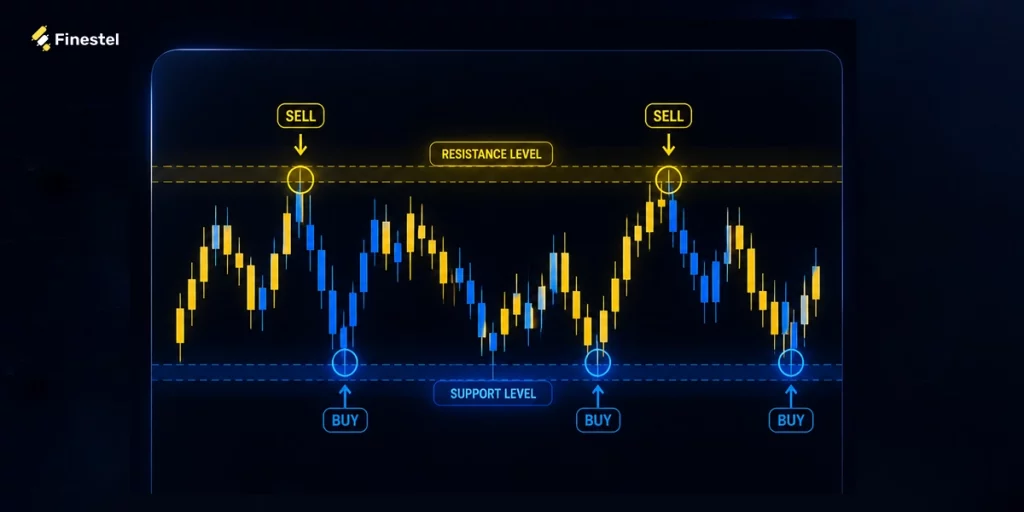
This is for when a coin is sitting in a range you can draw on the chart:
- Base order: $100
- DCA order size: $100
- Number of DCA orders: 4
- Price deviation: 1.5%
- Step multiplier: 1.0
- Size multiplier: 1.0
- Take profit: 1.5%
- Stop loss: 8%
Orders fill at 1.5%, 3%, 4.5% and 6% below entry. Total cost is $500. If all five orders are filled, your average entry price ends up about 3% below your original entry. With a 1.5% take profit, the price only needs to bounce about 4.5% from the lowest filled order for the bot to close the trade. In a ranging market, that kind of rebound is common.
Pullback Setup for an Uptrend
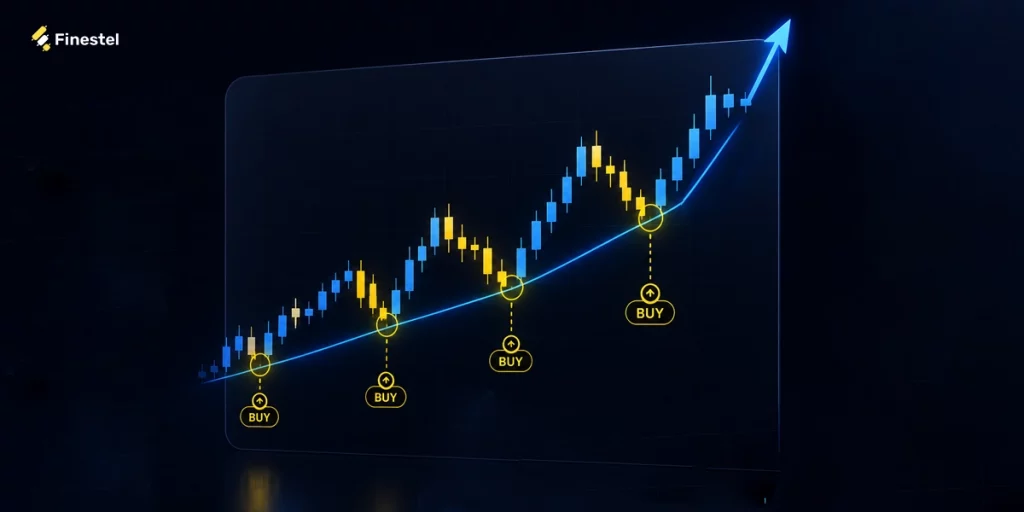
This one is for buying dips inside a trend that is still continuing. It needs more room than the range setup, because a pullback in an uptrend can be deep and still be normal.
- Base order: $100
- DCA order size: $100
- Number of DCA orders: 5
- Price deviation: 2%
- Step multiplier: 1.2
- Size multiplier: 1.1
- Take profit: 3%
The orders fill at 2%, 4.4%, 7.3%, 10.7% and 14.9% below entry. Sizes go $100, $110, $121, $133 and $146. Adding the best, the full deal costs about $710.
The step multiplier at 1.2 is doing the work. It stretches five orders across 15% instead of 10%. That is what lets a small number of orders cover a real pullback.
I keep the size multiplier at 1.1, not 1.5. At 1.5 the fifth order is $506, and the deal costs $1,418. That puts your biggest buy at the price where the trend is most likely already broken. I did this once on a coin that kept going, and the loss was four times what I planned for.
Before I turn this on, I check the daily chart for one thing: Is the last low still holding? If it breaks, I do not run this setup at all. And if I have already started, I will pause the bot by hand. Don’t wait for a percentage stop, because by then the trend has been gone for days.
Long-Term Strategy for BTC and ETH

In this case, the best DCA bot strategy is not trading; it is just buying on a schedule and holding.
- Base order: $100
- DCA order size: $100
- Number of DCA orders: 6
- Price deviation: 5%
- Step multiplier: 1.15
- Size multiplier: 1.0
- Take profit: set wide
- Reinvestment: off
Orders fill around 5%, 11%, 17%, 25%, 34% and 44% below entry. The total cost is $700.
If You Run This on Futures
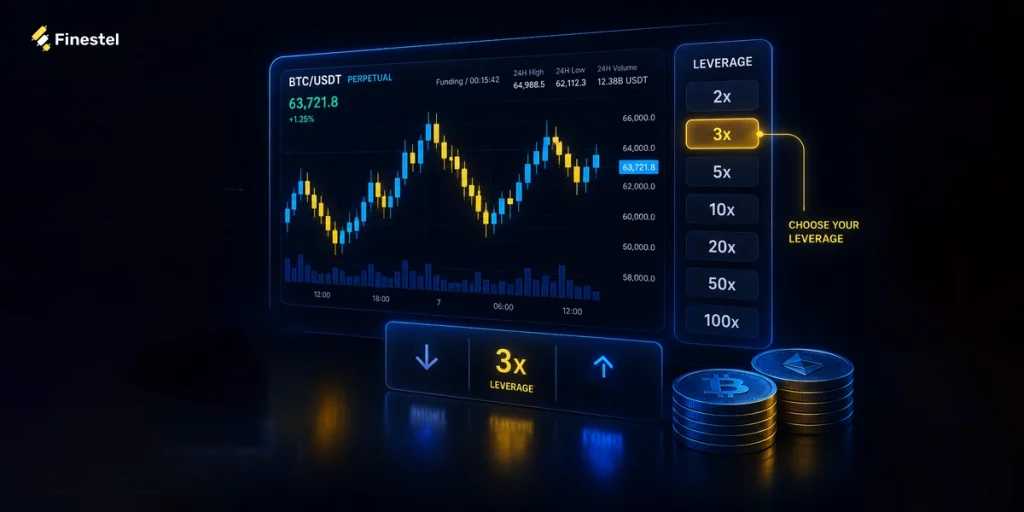
At 3x on a long, liquidation sits around 30% below entry. The pullback setup above finishes at 14.9%, so there is still space remaining. At 10x, liquidation sits closer to 9% below entry. That same setting runs out of room before the ladder finishes, and the exchange closes the position while your last orders are still unfilled.
Also, keep the size multiplier near 1.0, because every order you add makes the position bigger, and a bigger position means each further 1% drop costs more than the last one did.
Note that these numbers are approximate. I have used them for simplifying the calculations and delivering the concept. The exact liquidation price depends on multiple parameters such as the exchange liquidation formula, your margin mode, and the size of the position. Open the position and check the liquidation price your exchange shows you, then make sure your final DCA order sits above it.
When Should We Pause or Turn The Bot Off?

DCA is based on the idea that prices recover. When that doesn’t happen, you should override the bot. For example:
- Pause new deals when a coin breaks its long-term structure.
- Reduce your order sizes when you have committed more than you can handle.
- And accept that in some cases, like a clear downtrend or a failing project or a position near liquidation, averaging down is just a losing move.
Personally:
- I do NOT run these on coins listed in the last few months. There is no price history, so you are only guessing.
- I turn the bot off during news-driven drops. In these cases, 2% deviation built for normal days fills all five orders in ten minutes.
- And I do NOT start a deal I can not look at that day. The bot handles the orders; it does not decide when you were wrong. I try to start trades I can check at least once a day.
Final Thoughts
In a DCA bot, all settings answer two questions: how much can one deal spend, and how far down can it average before it runs out. You’d better answer those on paper first.
If you want to run DCA at that level, the Finestel DCA Bot, Signal Bot, and Trading Terminal are built for it. Whatever you choose, size it in a way that the worst case is one you can walk away from.
FAQs
What Is The Most Important DCA Bot Setting?
There is no single best setting, but capital coverage is one of the most important. It shows how much money your DCA orders can use. Many traders ignore it, but running out of capital can end a trade. All other settings are affected by this one.
Should a DCA Bot Use a Stop Loss?
It depends on your strategy. Long-term investors may choose not to use one and accept temporary price drops. But for short-term trades or leveraged positions, a stop loss can help limit losses.
Can I Run a DCA Bot on The Futures Market?
Yes, but leverage makes both the averaging and the risk of liquidation bigger, and that can happen before your plan even works. A size multiplier that is fine on spot can be dangerous on a leveraged position. Lower your risk assumptions to match.
How Many DCA Orders Should I Set?
Set enough orders to handle normal price drops, but make sure you have enough capital to support them. First decide how much you can afford to use, then choose the number of orders based on that.
Do DCA Bots Work in a Bear Market?
DCA depends on the price recovering. In a long downtrend, or on a coin in real decline, that does not happen, and the bot keeps buying into losses.
Is Backtesting a DCA Setup Reliable?
Backtesting shows how your settings would have done in the past, and it is worth doing. But it can lead to overfitting, which means you tune the numbers so tightly to old data that they fail on new data. So, backtest DCA bot settings as a check, not a promise.



Leave a Reply