

3Commas is one of the leading crypto trading automation platforms on the market, and this review will take an in-depth look at how the platform operates and whether its feature-rich interface can truly help streamline the process of trading digital assets.
As the name suggests, 3Commas allows users to develop customized automated trading strategies using bots to execute trades according to specific parameters, removing much of the manual work involved in monitoring the cryptocurrency markets.
The most important 2026 update to 3Commas is that its V1 will be deactivated on September 11, 2026, as the company transitions users to a new V2 platform built in partnership with WunderTrading. Existing strategies will not migrate automatically, exchange API connections must be set up again, and the V1 mobile apps are being retired. V2 introduces a redesigned workflow alongside Hyperliquid, Multi-API, and Multi-Exchange trading. This review therefore covers both what 3Commas V1 offered and what existing users can expect from V2.
If you are deciding whether to rebuild your setup on V2 or move to a different platform, see our comparison of the best 3Commas alternatives. It covers options for different needs, from retail trading bots to more advanced multi-account and asset-management workflows.
What Is 3Commas? A Comprehensive Review
3Commas is a trading bot and automation platform launched in 2017. Since then, it has empowered 2 million traders, integrated 9 major crypto exchanges, including Binance, Coinbase, KuCoin, and Hyperliquid, and now offers cross-exchange automation from a single dashboard, custom backtesting on 1-minute candles plus 11 indicators in bot logic, and advanced risk management in the bots.
From a DCA bot to automatically capitalize on dips to grid bots that profit from volatility, 3Commas aims to have a trading bot suited for any market condition or crypto trading strategy.
Founding and Growth
3Commas was founded by developers Yuriy Sorokin, Mikhail Goryunov, and Egor Razumovskii. The founders aimed to create an intuitive platform that made sophisticated trading automation accessible to all crypto traders.
In 2022, 3Commas raised a $37 million Series B round led by Target Global, Alameda Research, and Jump Crypto. This has enabled the expansion of platform capabilities and supported global user growth. 3Commas is headquartered in Road Town Tortola, British Virgin Islands.
V1 vs V2: What Has Changed?
Through the years, 3Commas developed into a top-notch trading automation platform offering DCA, Grid, and Signal bots alongside SmartTrade and portfolio management tools. Today, that product is referred to as 3Commas V1.
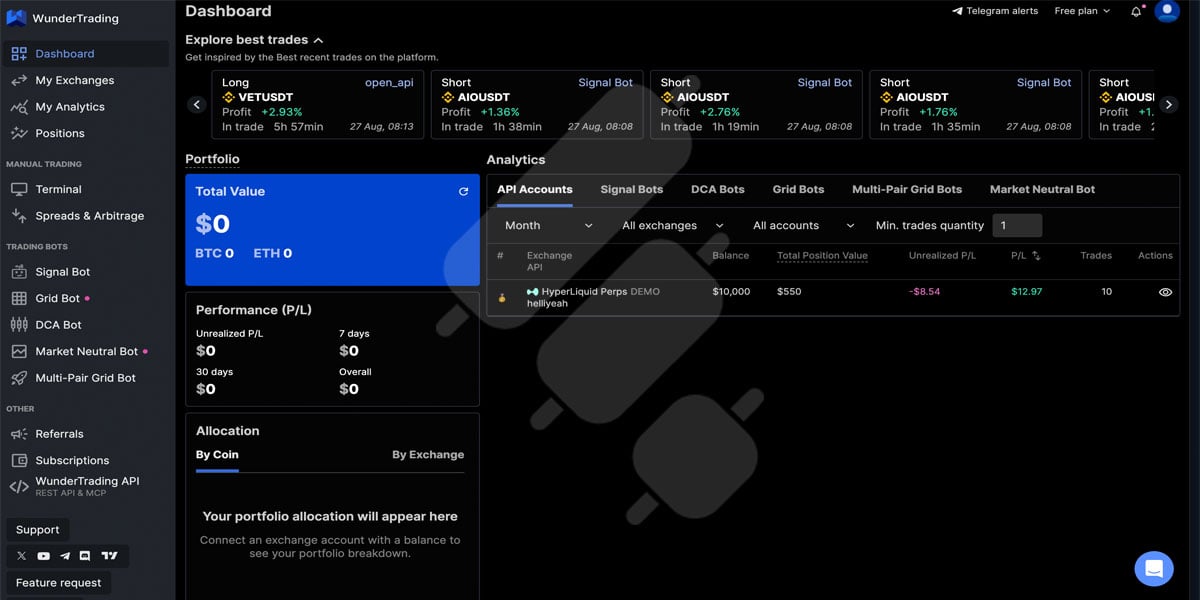
The new V2, which has been built in partnership with WunderTrading, has a much more streamlined interface. The table below shows how the features and bots in V2 compare with those in V1.
| Feature | v1 | v2 | Key Change |
| DCA Bot | DCA Bot | DCA Bot | Indicator-based DCA remains in DCA Bot; TradingView/API-triggered DCA moves to Signal Bot |
| TradingView DCA Bot | DCA Bot | Signal Bot | Moved to Signal Bot |
| API-triggered DCA Bot | DCA Bot | Signal Bot | Moved to Signal Bot |
| Strategy Gallery | Strategy Gallery | DCA Bot Presets | Integrated into DCA Bot |
| DCA Management | Control Panel | DCA Bot tab | Dedicated section |
| Custom Signals | Custom Signals | JSON + Signal Source | New setup structure |
| Analytics | — | My Analytics | Centralized performance data |
| Portfolio | My Portfolio | My Exchanges | Renamed/reorganized |
| Smart Trade | Smart Trade | Terminal | Expanded with Multi-API, Multi-Exchange & Multi-Pair |
| Positions | — | Positions tab | Dedicated Signal Bot positions view |
| Dashboard | Exchange overview | Analytics + Portfolio Value | More statistics and insights |
| Subscription | V1 subscription | V2 + bonus time | Remaining time transferred with promo code |
| Mobile Apps | V1 apps | V2 apps | V1 apps will be retired, with V2 mobile apps planned for a later release. |
| Quant Pilot | — | QuantPilot | Lets you generate, edit, and run trading strategies using AI, research markets, and build automations through natural-language workflows |
| Hyperliquid | — | Added | Is supported now |
As you can see, the biggest change for existing users is that DCA Bots triggered by TradingView or API are no longer created through the DCA Bot section and have been moved to Signal Bot. In addition, Terminal expands on Smart Trade by supporting multiple accounts, exchanges, and trading pairs. For more information, check out 3Commas official announcement here.
3Commas V2 Key Features and Tools for Automated Trading

In the following section, I will take a closer look at some of 3Commas’ key features in its V2 in 2026, including its interface, supported exchanges, trading bots, and the changes introduced in V2.
Signal Bot
A signal trading bot executes trades based on alerts from platforms like TradingView, enabling users to profit from price movements by automatically managing entries and exits. The Signal Bot feature was a core part of 3Commas V1 and is still available in V2, but its setup has been reorganized around the source of your trading signals.
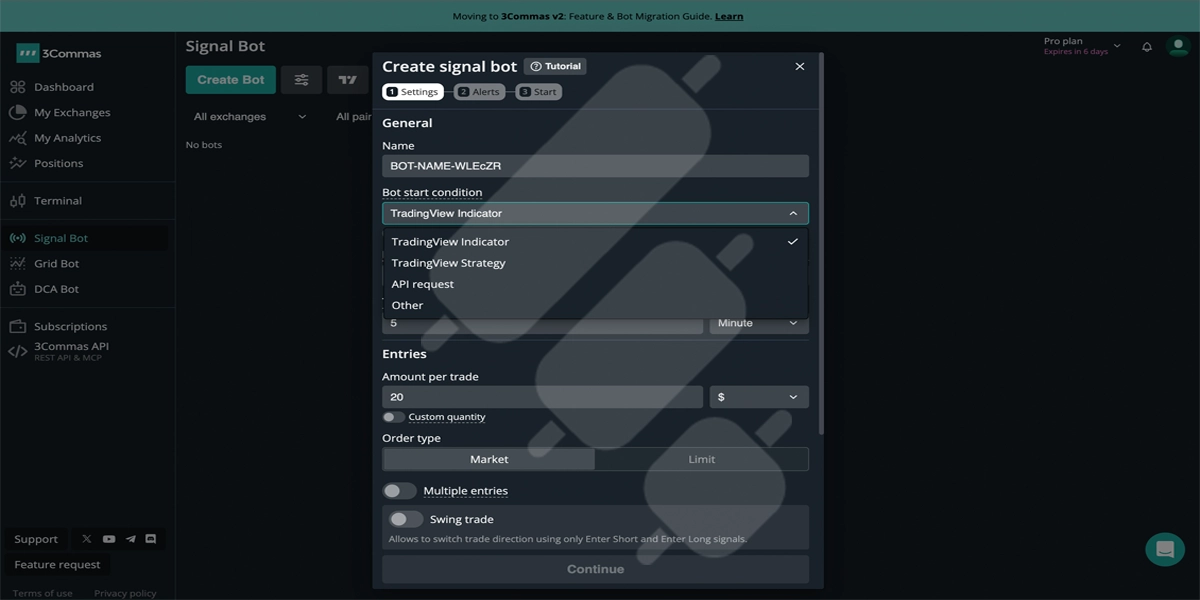
If you are using a TradingView indicator or strategy, you should select “TradingView Indicator” or “TradingView Strategy” as the bot’s start condition. For Custom Signals, you can now enable JSON and choose the start condition that matches your signal source, such as a TradingView Indicator, API Request, or another supported source.
In other words, instead of treating custom signals as a standalone signal type, 3Commas v2 lets you define where the signal comes from and how the signal data is delivered.
DCA Bot
The DCA Bot is one of 3Commas’ core automation tools, allowing users to automate entries and position averaging with configurable base and averaging orders.
Instead of keeping all DCA-related triggers under one bot type, 3Commas now separates them based on how the strategy is triggered. Also, Indicator-based strategies remain under DCA Bot, while TradingView- and API-triggered strategies have moved to Signal Bot. Strategy Gallery has also been integrated into the DCA Bot workflow as DCA Bot Presets.
Grid Bots
It automates grid trading strategies by placing buy and sell orders at pre-defined price intervals around a price range. This allows you to benefit from volatility and market swings within that range through buying low and selling higher. This feature remains largely unchanged from V1.
Terminal
Trading Terminal brings everything you were used to in “Smart Trade” in V1 into one place, while giving you more flexibility when managing trades across different accounts, exchanges, and trading pairs.
This feature is best for active traders who want to manually execute and manage trades with fine‑grained control over entries, exits, scaling, and risk.
Beyond the core Smart Trade features, Terminal also adds:
- Multi-API: Manage trades across multiple connected API accounts.
- Multi-Exchange: Execute and manage trades across different exchanges.
- Multi-Pair: Monitor and manage multiple trading pairs from a single interface.
Simultaneous Trade Execution
On 3Commas, you can connect up to 50 APIs from multiple exchanges and manage them via the Terminal or a Signal Bot. This enables you to mirror and execute trades across multiple APIs simultaneously.
Supported Exchanges
3Commas supports nine exchanges in 2026, which you can see in the table below:
| Exchange | Markets | Signal Bot | Grid Bot | DCA Bot | Multi-Exchange Trading | Terminal |
| Hyperliquid | Spot Futures (USDT-M) |
✓ | Spot Futures (USDT-M) |
Spot Futures (USDT-M) |
✓ | ✓ |
| Binance | Spot Futures (USDT-M) Futures (Coin-M) |
✓ | Spot Futures (USDT-M) |
Spot Futures (USDT-M) |
✓ | ✓ |
| Bybit | Spot Futures (USDT-M) Futures (Coin-M) |
✓ | Spot Futures (USDT-M) |
Spot Futures (USDT-M) |
✓ | ✓ |
| OKX | Spot Futures (USDT-M) Futures (Coin-M) |
✓ | Spot Futures (USDT-M) |
Spot Futures (USDT-M) |
✓ | ✓ |
| Bitget | Spot Futures (USDT-M) Futures (Coin-M) |
✓ | Spot Futures (USDT-M) |
Spot Futures (USDT-M) |
✓ | ✓ |
| Gate | Spot Futures (USDT-M) Futures (Coin-M) |
✓ | Futures (USDT-M) | Futures (USDT-M) | ✓ | ✓ |
| Kraken | Spot Futures (USDT-M) |
✓ | Spot, Futures (USDT-M) | Spot, Futures (USDT-M) | ✓ | ✓ |
| KuCoin | Spot Futures (USDT-M) |
✓ | Spot, Futures (USDT-M) | Spot, Futures (USDT-M) | ✓ | ✓ |
| Coinbase | Spot Futures (USDT-M) |
✓ | Spot, Futures (USDT-M) | Spot, Futures (USDT-M) | ✓ | ✓ |
Demo / Paper Trading
Paper trading is a great way to test trading strategies with virtual funds before putting real money at risk. When adding an exchange account to 3Commas, you can select Binance, Bitget, Bybit, Gate, Hyperliquid, Kraken, KuCoin, or OKX as a demo account and receive $10,000 in virtual USDT or USDC to practice trading. This allows you to evaluate performance before committing to real capital.
Backtesting
Backtesting strategies lets you run your strategy against real historical data to see how it would have performed. With the 3Commas backtesting feature, you get access to a full toolkit to test, refine, and bulletproof your trading strategy before it hits the market.
Mobile Apps
3Commas mobile apps for iOS and Android give you the ability to access and manage your trading from anywhere. Bots and orders can be tweaked on the go.
The V1 version of these apps will be removed and will no longer be supported, and V2 mobile apps will be available later on.
QuantPilot
QuantPilot is a new AI-powered trading product developed by the 3Commas team. It lets you generate, edit, and run trading strategies using AI, research markets, and build automations through natural-language workflows. As part of the transition, eligible users receive QP tokens (see Q7) to try it out
When you upgrade your account to V2, you get extra free month(s) on top. The exact number of free days you’ll receive will be confirmed in your email, plus QP tokens to try 3Commas AI-powered QuantPilot.
QP tokens are usage credits for AI features on QuantPilot.com. They are not cryptocurrency, wallet tokens, or blockchain assets; they’re internal credits used inside QuantPilot. QP tokens may be used when QuantPilot processes AI actions such as:
- Generating strategy ideas
- Editing or explaining strategies
- Running AI strategy workflows
- Researching markets and analyzing data
- Creating or refining QuantScript
- Running longer agent tasks
For a comprehensive review of how to use Quantpilot, read our article.
3Commas User Reviews: Reddit, YouTube & Trustpilot (2026 Update)

3Commas had a 4.4/5 on Trustpilot in Oct 2025. Now, in August 2026, its rating has dropped to 3.9/5. The positive comments still appreciate 3Commas’ strategy execution, its trading bots, the ability to customize everything, and its market information.
Yet, the more recent reviews come from the frustration of having to recreate the previous setups on V2. Since V2 is not simply an update to the existing platform, it runs on a completely different infrastructure, which unfortunately makes a direct rollover of bots, settings, trades, and historical data technically impossible. That is why many users find it difficult to close all the positions and create new ones.
Positives
- TrustPilot – Jan 9, 2026: “Guys, you are the best bots platform ever! Please add Mexc.com support! I’m waiting for years.”
- Reddit: “Week 1 2025 bot profit of $20.59 on small capital.”
- Support: Fast fixes via 24/7 chat/Telegram. “API issue resolved in hours.”
- YouTube: “Best crypto bot in 2025? AI signals and backtesting work for pros and beginners alike.” (50k+ view review, Jul 2025)
Negatives
- TrustPilot – Aug 23, 2026: “They unilaterally decided to upgrade to V2 while your existing bots and trades can not transfer. I had to close all my positions, resulting in some thousand dollars in losses.”
- YouTube – Aug 12, 2026: “They are banning users from Discord for raising legitimate concerns or asking difficult questions as paid subscribers. I do not even know what I am supposed to do about my active deals, as there is no way to export and import them. A lot of important features are missing from V2, and honestly, V2 feels like a half-baked product. As a paying customer, it is frustrating to raise valid concerns and questions, only to be ignored by support and then banned from the community for speaking up.”
- Bugs/Outages: Crashes during market corrections. “No alerts when service drops.”
- Pricing vs. Reliability: “Bots are powerful, but stability needs improvement before Pro fees feel justified.”
3Commas Pros & Cons; User Perspectives (2026)

Pros (Most-Cited by Users)
- Time-saving automation: DCA and Grid bots run 24/7, eliminating manual monitoring.
- Beginner-friendly setup: Intuitive interface and pre-built bots allow novices to start in minutes.
- Demo trading: Free paper trading with real slippage and 3-year historical data.
- Fast support: 24/7 live chat and Telegram resolve issues quickly (average <2h response).
- Multi-exchange control: Unified dashboard for 9 exchanges (Binance, Bybit, Coinbase, etc.).
Cons (Common User Complaints)
- Occasional outages: Platform glitches during extreme volatility; missed fills reported.
- Subscription cost: Pro plan feels high if bots underperform due to bugs.
- Limited free tier: Only 1 bot active; full features locked behind paid plans.
- Security concerns (historical): Past API leaks (pre-2025) still raise caution despite IP whitelisting.
- V1 to V2 migration hassles: V1 shutdown creates forced migration work, bots and strategies do not transfer automatically, exchange APIs must be reconnected, V1 mobile apps are being discontinued, product and pricing structure has changed substantially over the past year, Asset Manager is scheduled to shut down by end-2026.
3Commas Pricing and Fees Review
By clicking on the “Subscription” in the left sidebar menu of the dashboard, you can see the subscription plans and their features and limitations.
When you first sign up, you get 7 days of free access to the Pro plan. After that, you need to purchase one of the plans offered, and you can see their details in the table below:
| Plan | Monthly Price | Annual Price Billed Monthly (up to 25% off) | Key Limits & Features |
| Starter | $20 | $15 (Save $60 per year) | 1 API key per exchange
1 Multi-API trade 2 Signal bots 5 DCA bots 2 Grid bots |
| Pro | $50 | $38 (Save $150 per year) | 5 API Keys per exchange
10 Multi-API trades 20 Signal bots 20 DCA bots 10 Grid bots |
| Expert | $140 | $105 (Save $420 per year) | 25 API Keys per exchange
50 Multi-API trades 1K Signal bots 1K DCA bots 1K Grid bots |
3Commas Dashboard Review
The 3Commas dashboard provides a central interface to manage your trading bots, analyze performance, and execute trades.
Interface Overview: Almost the Same Interface as WunderTrading
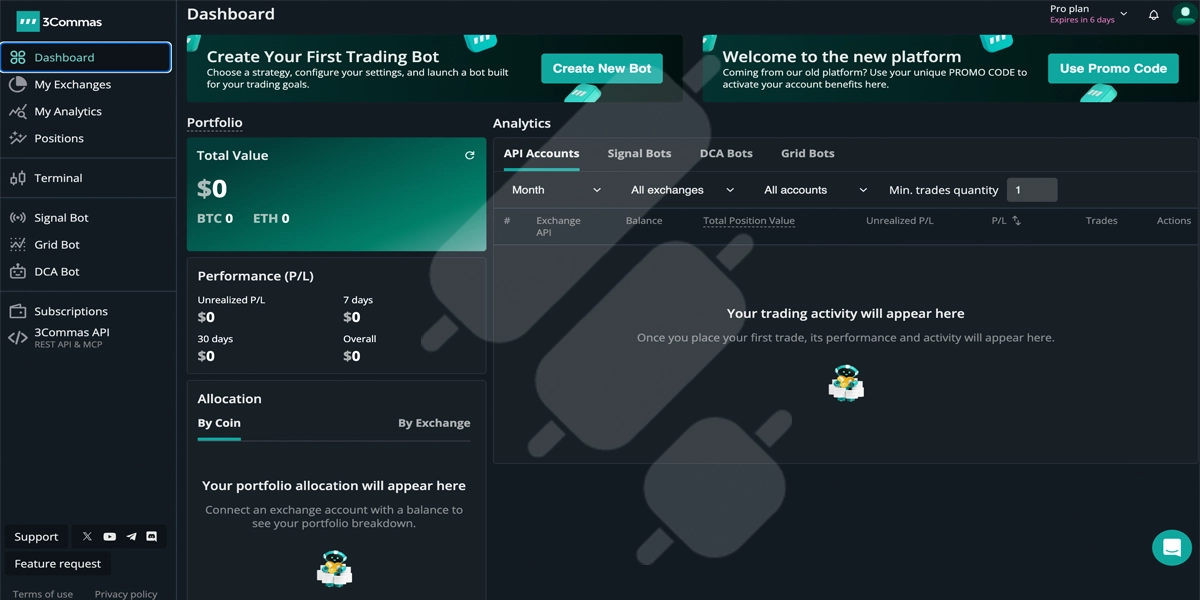
The 3Commas interface has changed significantly in V2. In the image below, you can see the old dashboard.
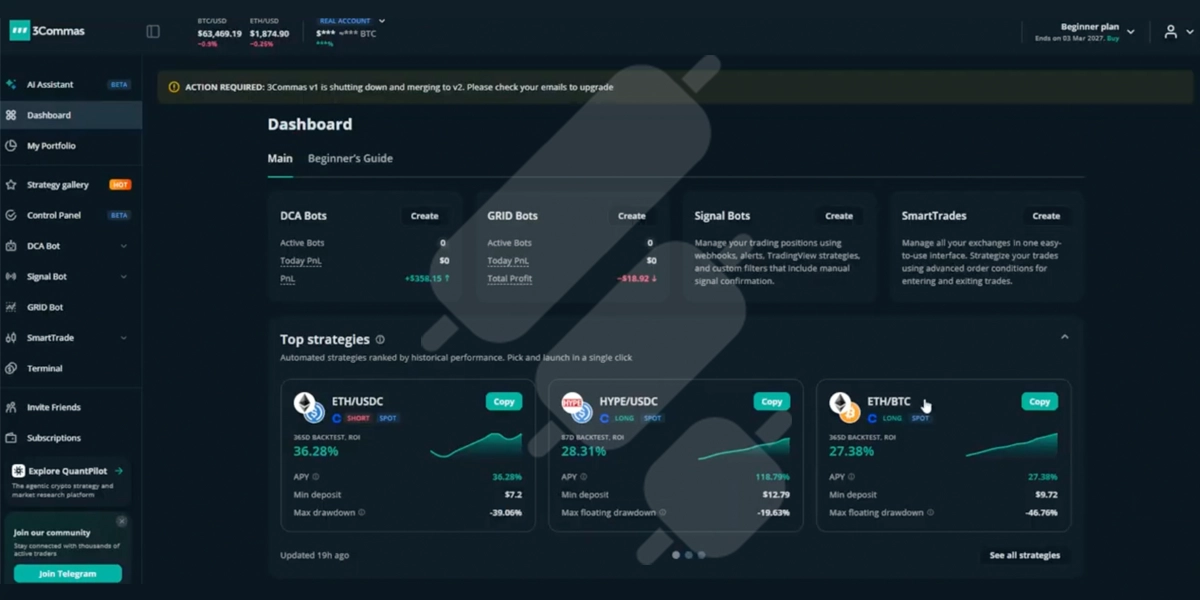
In the new interface, many of the options in the left sidebar have been merged into other sections, as I mentioned earlier.
Upon logging in, you land on the main Dashboard page. Here, you have an overview of your portfolio balance, your performance (P/L), and quick access to analytical details of all your API accounts and bots that you create.
The new V2, which has been built in partnership with WunderTrading, has a much more streamlined interface. What I can say is that the 3Commas V2 is practically the current WunderTrading interface, with some limitations in the bots that WunderTrading is offering right now. For a comprehensive WunderTrading review, read our article.
My Exchanges
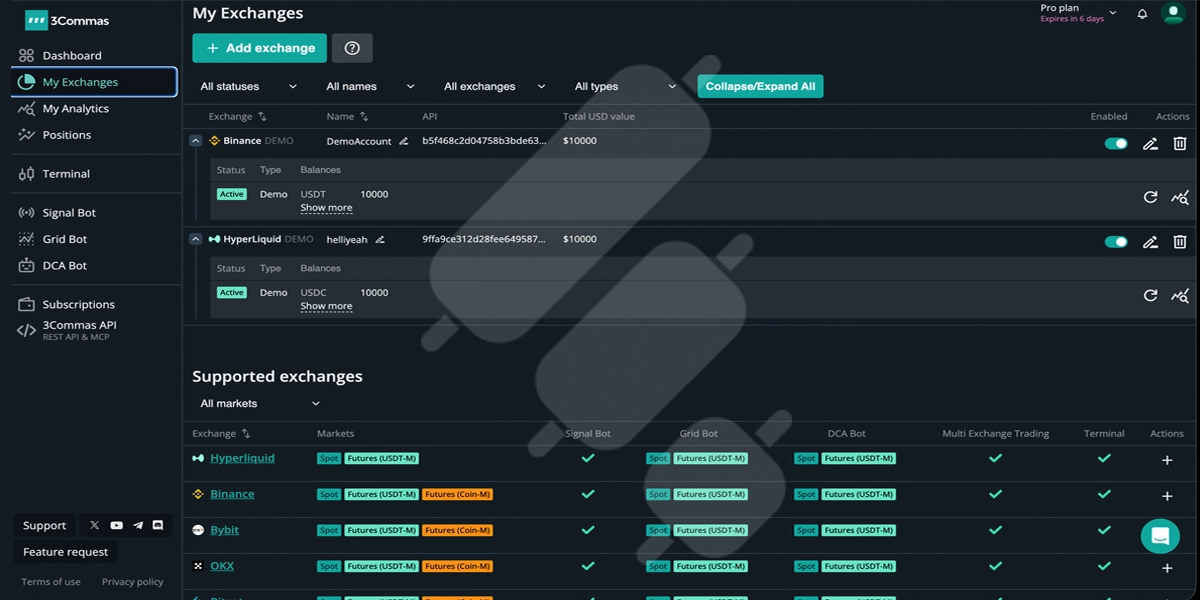
The “My Portfolio” tab in V1 is now called “My Exchanges”. Here, you can check all of your exchange accounts and create a new one from the supported exchanges.
My Analytics
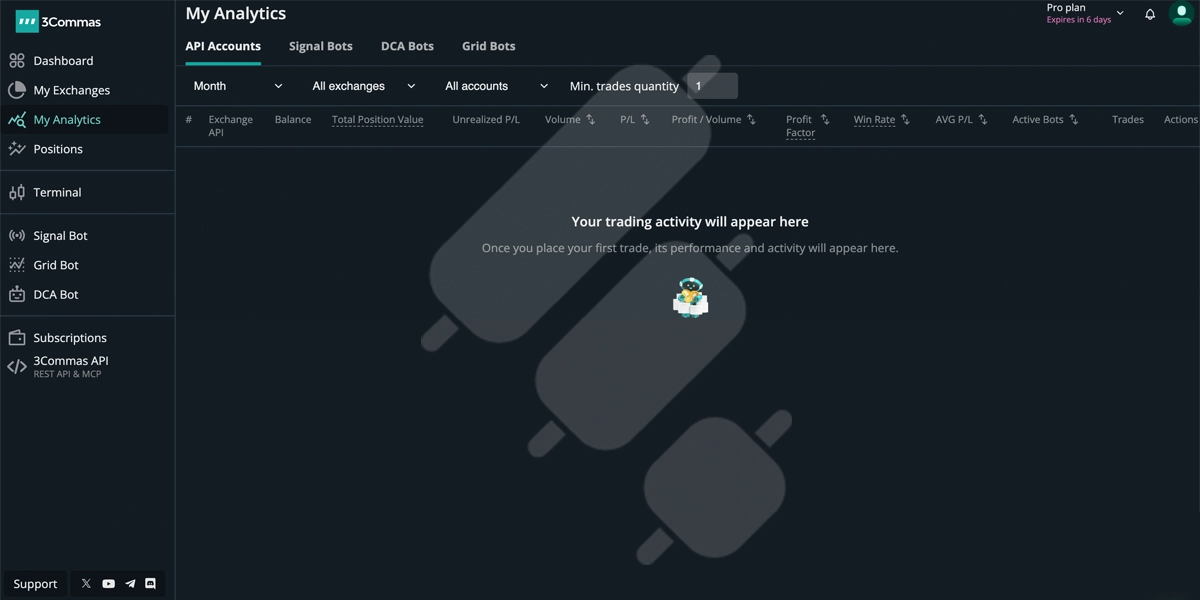
The “My Analytics” tab is where your trading activity and its performance will appear. You can sort your trades based on weekly, monthly, or all-time periods and manage your exchange APIs, balance, total position value, unrealized P/L, volume, P/L, win rate, and many more.
Positions
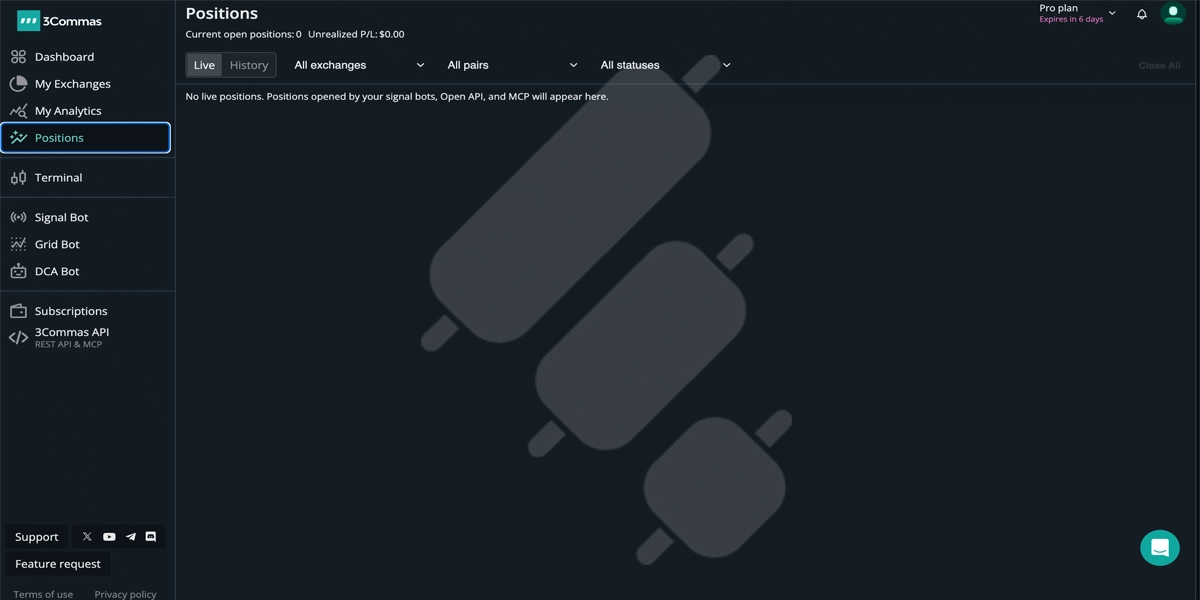
In the “Positions” tab, you can monitor your live positions opened by your signal bots, Open API, and MCP; you can also see the history of your old positions and their performance.
Terminal
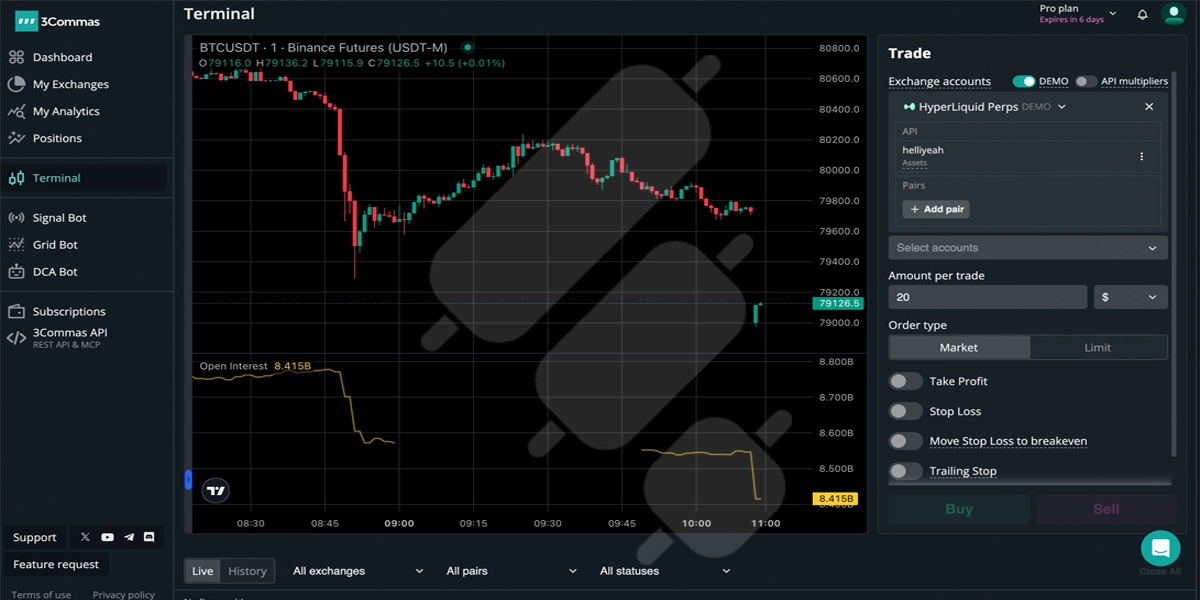
The terminal is where all the trading happens. Just choose your connected exchange account and start trading manually.
Signal Bot
In the “Signal Bot” tab, you can create a bot from scratch. The workflow is easy; if you are using a TradingView strategy or indicator as a starting condition, just set your alert in TradingView and confirm the settings. If you have another resource, choose “ApI request” and complete the process.
DCA and Grid Bots
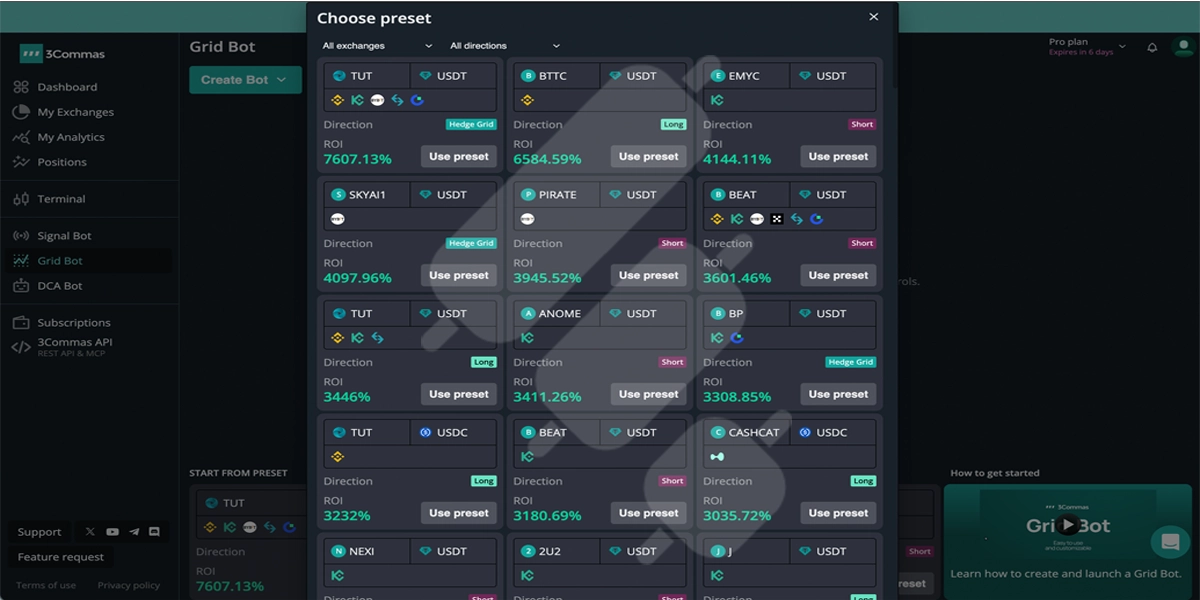
You can create a new DCA or Grid bot or use one of the presets available. Just configure settings like your exchange account, pair, position type, order amounts, and schedule. You can also backtest the chosen strategy before using your real money.
Guide to Setting Up 3Commas Bots
Here, I will explain how to set up a DCA or Grid bot on 3Commas in more detail.
Configuring DCA Bots
To set up a DCA bot on 3Commas, first, choose “DCA Bot” from the left sidebar. In the new screen, click “Create Bot” and choose “New bot” or “Start from preset”. Here, I will choose “New bot”.
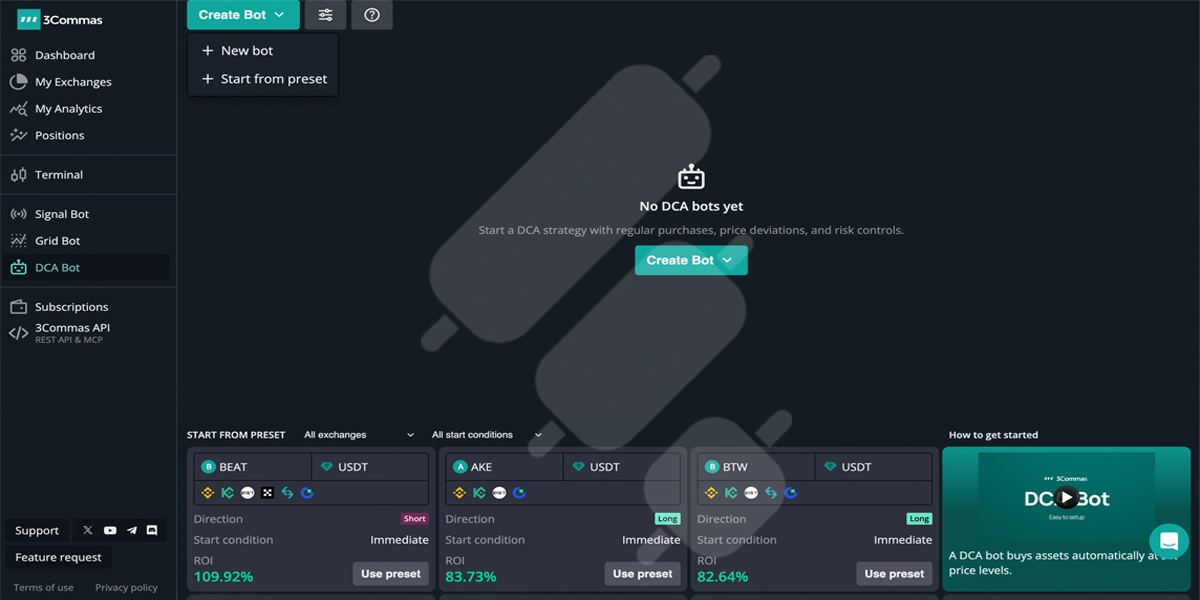
Next:
- Select the exchange account that you want to trade on.
- Choose the cryptocurrency pair you want to trade from the list of available options. This could be BTC/USDT, ETH/USD, etc.
- Select the direction of the position from Long, Short, or Both.
- Choose the bot start condition from “Immediate” or “Indicator”.
- Enter the amount per trade.
- Choose DCA mode, averaging method, max DCA orders, price deviation, order size multiplier, price deviation multiplier, and take-profit and stop-loss.
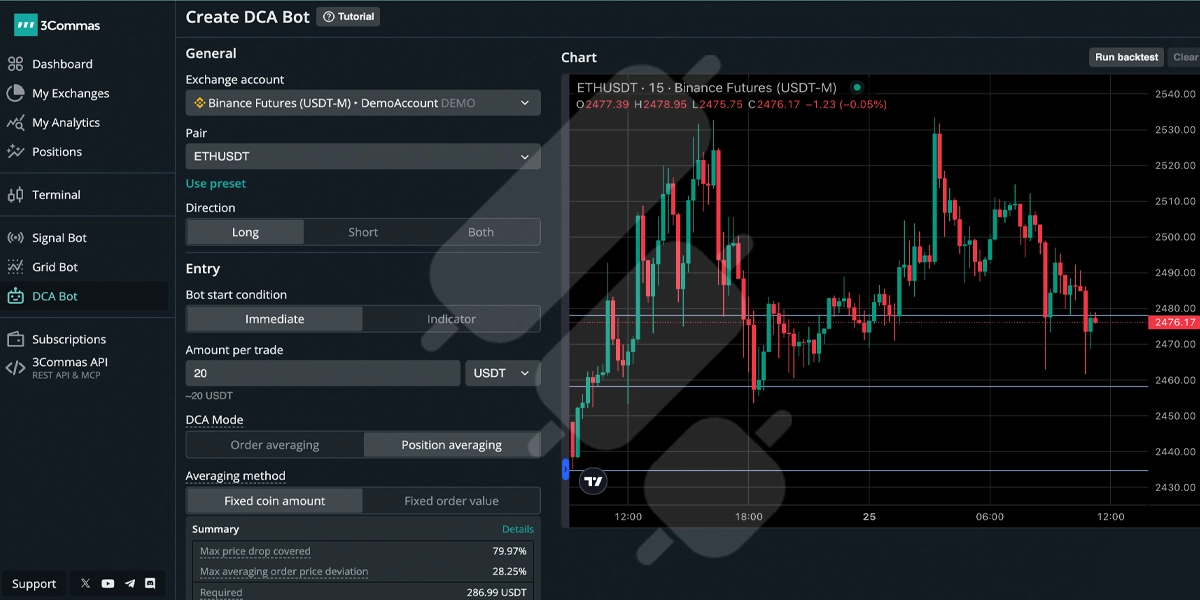
Click “Create Bot” to get your bot ready. To read more about the best DCA bot settings, read our article in Finestel’s blog.
Configuring Grid Bots
The same process applies to creating a Grid bot on 3Commas: choose “Grid Bot” from the left sidebar. In the new screen, click “Create Bot” and choose “New bot” or “Start from preset”. This time, I will choose “Start from preset” to show you a different process. You can also scroll down this page to see the available options.
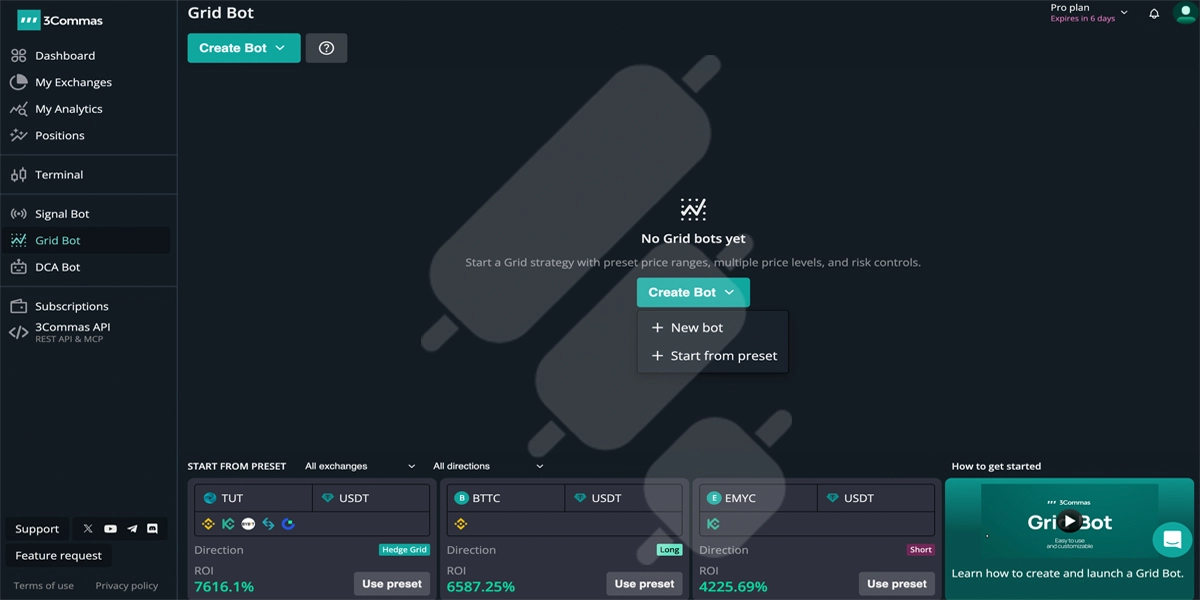
By clicking on “All exchanges” from the dropdown menu in the taskbar, you can choose an exchange to see its available presets. Then, click “Use preset” on the desired one.
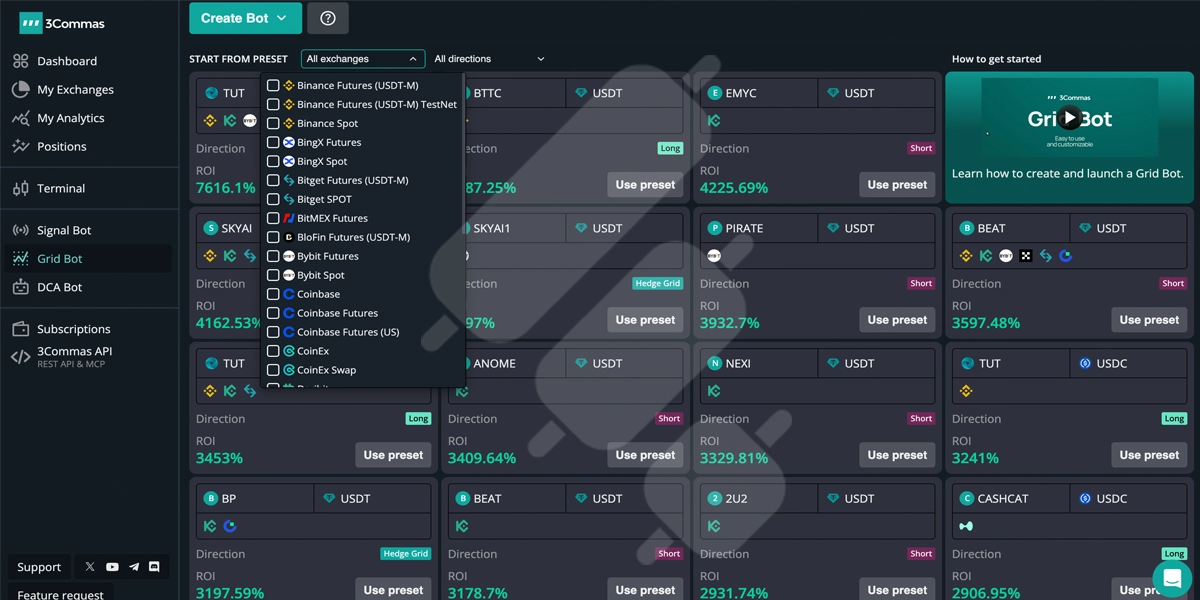
Now you can see the bot’s base settings. The good thing is that you can also adjust all the parameters and settings of the preset bot to suit your preferences.
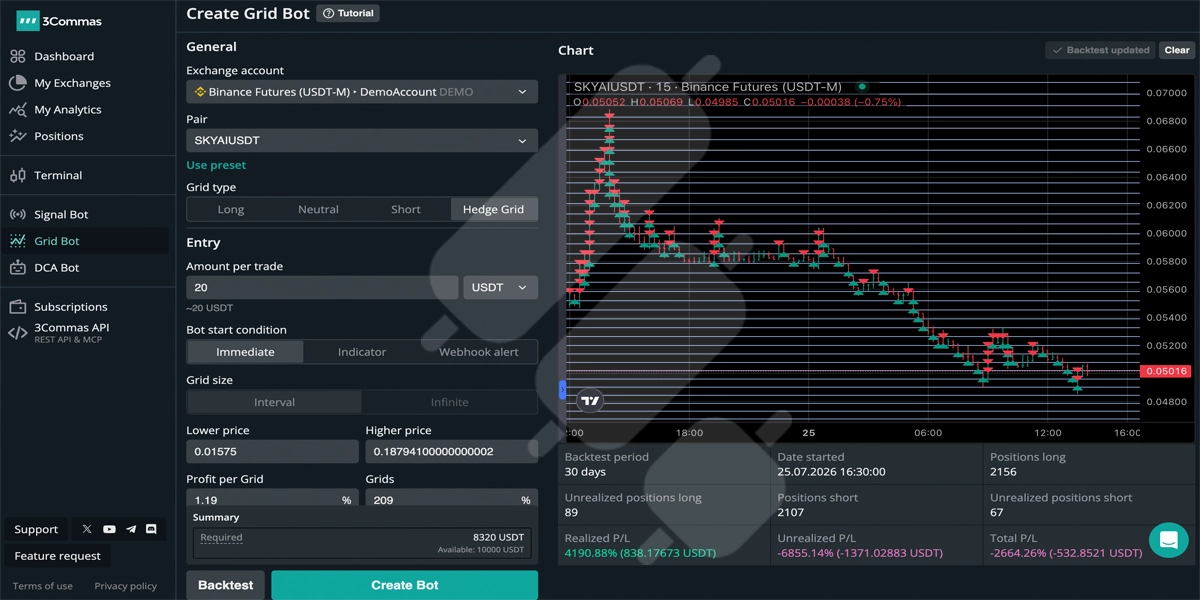
Click “Create Bot” to initiate it.
3Commas vs. Finestel: When to Switch, and When to Use Both
Now that 3Commas has introduced its V2, it is worth reviewing how its focus has changed alongside Finestel. One thing to mention in advance is that this isn’t about which one’s “better”; it’s about recognizing when you’ve outgrown retail tools and need professional infrastructure.
3Commas V2 vs Finestel for Asset Managers
Finestel was built for asset managers and trading desks: non-custodial, simultaneous order execution across multiple accounts on 10+ crypto exchanges. Its trade copier with proportional sizing, white-label branding, and automated billing lets managers run client accounts as a business.

3Commas did expand beyond retail trading through its Asset Manager product, which included multi-client management and reporting. However, Asset Manager entered a stable phase on July 1, 2026, with no new features or routine maintenance planned, and 3Commas says the product will be fully discontinued by the end of 2026.
For professional managers, the comparison has therefore changed. The question is no longer whether 3Commas ever offered asset-management infrastructure, but whether it makes sense to build new operations on a product that is already scheduled for retirement.
3Commas V2 vs Finestel for Retail Traders
3Commas dominates the retail bot market for a good reason. Operating since 2017, 3Commas gives individual traders sophisticated automation without coding. DCA bots and grid bots, all with deep customization, backtesting, and connections to 9 exchanges, are now available in 2026; they are perfect for optimizing your personal trading strategies. Read more about 3Commas copy trading in our blog.
For solo traders, Finestel now offers much of the workflow that previously made 3Commas attractive. Hyperliquid is already integrated across Finestel’s DCA bot, Grid bot and TWAP, the multi-account trading terminal, Signal Bot, TradingView Bot and trade copier. Webhook-driven automation and non-custodial, multi-account, multi-exchange execution are live in production.
This makes Finestel worth evaluating not only for asset managers, but also for advanced individual traders who would otherwise need to rebuild their V1 workflows on 3Commas V2. Besides crypto, professional traders and managers can also trade stocks, ETFs, and commodity perpetuals (e.g., NVDA, gold, oil) from the exchange accounts they already have on supported venues.
Feature Comparison: Where They Overlap and Diverge
In the table below, you can see a quick review of the 3Commas and Finestel features:
| Feature | 3Commas | Finestel |
| Primary audience | Solo traders, bot enthusiasts | Professional solo traders, trading groups, asset managers, funds, and trading desks |
| Bot and execution variety | DCA, Grid, Signal, TradingView | DCA bot, Grid bot, TWAP, Signal Bot, TradingView Bot, multi-account Terminal, Trade Copier |
| Exchange coverage | 9 | 10+ exchanges, CEX and DEX (incl. Hyperliquid) |
| Execution speed | Standard API latency (1-3 sec) | Simultaneous execution: one order placed on all selected accounts at once |
| Client management tools | None | Client onboarding, reporting, and trading groups |
| Billing automation | None | Performance fees, management fees, subscriptions |
| White-label branding | Not available | Custom domain, logo, client portals, themes, and more |
| Mobile access | Yes | Yes |
| Support | 24/7 chat/email | 24/7 VIP Telegram + dedicated manager |
| Track record | Years of retail stability, 3.9/5 ratings in 2026 | – ~$40M in client assets connected – 2,000+ client accounts run by one customer – 5.0 on G2 and Slashdot |
| Pricing | – Starter: $20/mo
– Pro: $50/mo – Expert: $140/mo |
– Free Starter plan: 1 exchange account + multiple Hyperliquid accounts (promo), no card needed.
Subscription plans: Annual billing saves 25% |
Which one is Best for Managing Client Capital
3Commas is designed around individual trading accounts. You can create signal groups for friends or small communities to follow your trades, but there’s no infrastructure for proper client management, individual performance tracking, or investor documentation.
Finestel’s architecture centers on multi-account, multi-exchange execution. It’s non-custodial: each client keeps funds on their own exchange account, connected by API key, and you manage everything under your own brand. The trade copier sizes positions in proportion to each account’s capital. Also, each client gets separate performance tracking and reporting. If you’re managing external funds, this infrastructure is either essential or completely unnecessary depending on whether that’s what you’re doing.
Which one is Best for Branding and Client Perception
3Commas operates under its own brand. When you work with clients, they’ll see they’re using a third-party platform. For many traders, this doesn’t matter. For others building a professional firm, it affects positioning.
Finestel offers complete white-label customization: your domain, logo, and branding throughout client portals. Clients log into what looks like your platform, not a resold service. Whether this matters depends entirely on how you’re positioning your trading operation.
Fee Collection and Billing Comparison
3Commas doesn’t handle billing since it’s not designed for client fund management. If you’re charging fees, you’ll handle invoicing, performance fee calculations, and payment collection separately through your own systems.
Finestel automates billing for any fee structure: performance fees (with high-water mark tracking), management fees, or subscription models. Calculation and collection happen automatically based on actual trading performance. This either saves significant administrative work or is completely irrelevant, depending on your business model.
Stick with 3Commas alone if:
- Trading personal capital only (no clients)
- Want preset bots and customization
- Don’t need business infrastructure
Switch to Finestel if:
- Managing client funds or investor capital
- Need white-label branding and privacy
- Need automated client billing and per-account reporting
- Building a scalable trading business
Use both if:
- Want 3Commas’ advanced bots + Finestel’s multi-account execution and client management
- Serious about fund management or prop trading
- Want 3Commas’ bot library plus Finestel’s business layer (onboarding, billing, white-label)
Try Finestel on the Free plan: connect one exchange account plus 3 Hyperliquid accounts, no card needed. Compare plans.
Final Thoughts
In summary of the 3Commas review, it provides crypto traders with an extensive suite of trading automation capabilities through bots and advanced order types. The platform aims to make sophisticated trading strategies accessible to all skill levels.
The range of bots, from DCA to grid and paper trading features, allows you to automate everything from simple dollar-cost averaging to complex volatility harvesting. Portfolio analytics and tracking provide insights into asset correlations and performance.
However, effective utilization still requires understanding how to configure and backtest bots properly. The subscription plans also add to overall trading costs. But the discount offers and free trials help alleviate this.
3Commas V1 was a mature crypto automation platform. But in 2026, reviewing 3Commas is no longer only about its bots, features, or pricing. Existing users now have to decide whether rebuilding their workflows on the new V2 platform is worth the migration effort, or whether this is the right time to evaluate an alternative.
FAQs
Is 3Commas safe to use?
3Commas uses API connections to interact with your exchange accounts, so you can automate trades without giving the platform direct access to your funds.
What will happen to my account when V2 migration is complete?
3Commas V1 will be deactivated on September 11, 2026. Existing bots will continue to operate until that date. There is no automatic bot migration. Strategies must be manually rebuilt in V2. Existing API connections will not be transferred. The V1 iOS and Android apps will also be retired, with V2 mobile apps planned for a later release. Any remaining V1 subscription time can be transferred to V2 using a promo code.
Does 3Commas charge trading fees?
3Commas does not charge a separate fee for each trade. The trading fees are charged by the exchange where the trade is executed and depend on that exchange’s fee structure and your account tier. 3Commas’ own cost comes from its subscription plans.
What happens if my 3Commas subscription expires?
When your paid subscription expires, your account moves back to the applicable Free plan limitations. Existing trades may still be managed according to their configured settings, but your ability to create or run bots can be restricted based on the limits of your current plan.



Yes thats right! 3Commas doesn’t have any real copy trading service